.png)


 Chat with us now!
 Send Email!


If you’re faced with your first W2 and you have some questions, know that many people feel the same way. It’s like solving a mystery when it comes to the first time how to read a w2 statement. But this guide provides you with information about your earnings, the taxes your employer paid on your salary, and the information you must enter in your tax return.
The following article walks you step-by-step through the W2 form. You learn what exactly the boxes stand for, where the data was obtained from, and the most commonly misunderstood aspects of the form. As a free check stub reference, use your most recent paycheck stub for comparison, as it is the easiest way to identify errors
What Is a W2 Form?
The W2 tax form is the official document known as the wage and tax statement that your employer sends every year to report what they paid you.
This tax form serves the purpose of reporting the payment amount from an employer and the tax deduction amounts. The W2 forms are distributed by employers to employees, the Social Security Administration, and the IRS.
Employers must submit W-2 forms by January 31 every year; if January 31st is on the weekend, then forms will be submitted the next business day. In the case of the tax year 2026, an employee would receive the W-2 forms in late January or early February of the tax year 2026. The obtained tax form will be used during the tax return preparation process.
It should be noted that W2 forms are only used by employees.
How Does a W2 Look Like?
It is better to understand the layout before going through each box. Don’t be confused about “how to read w2 forms,” as the W2 form consists of two parts, namely the left part and the right one.
- Left part: your and your employer’s information is provided here, indicated by letters from A to F.
- Right part: it consists of the financial information, indicated by numbers from 1 to 20.
There are several copies of the form.
- Copy A is submitted to the Social Security Administration,
- Copy B is submitted with the federal tax return,
- Copy C is for you to keep, and
- Copy 2 is submitted to the state or local tax authorities.
Employers usually print all the copies on a single sheet, so you should not be surprised if you see duplicate numbers in different copies.
Even if your employer transmits the W2 form electronically, the layout will remain the same, just on the screen.
How to Read Your W-2: The Lettered Boxes (Boxes a to f)
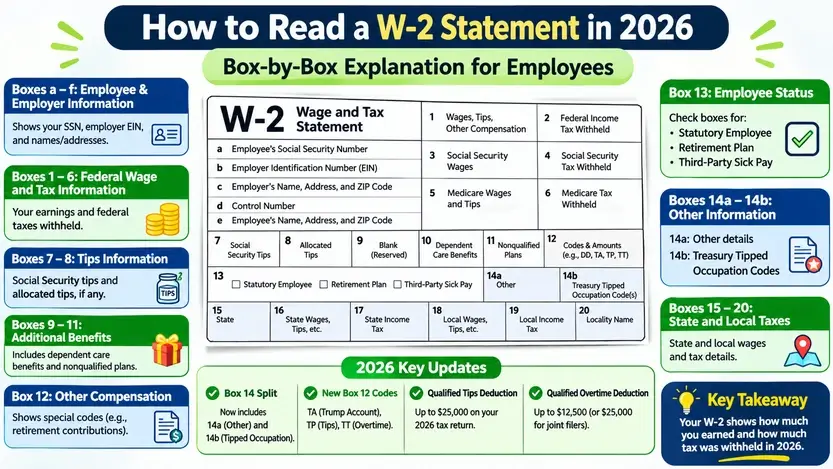
The lettered boxes on the left hold identity details. They look boring, but errors here can delay your tax return, so check each one.
| Box | What it shows | What to check |
| a | Your Social Security number | Every digit matches your card |
| b | Employer identification number (EIN) | Matches the EIN on your paystubs |
| c | Employer’s name, address, and ZIP code | Correct company name |
| d | Control number | Used by your employer to track the form, often blank |
| e | Your first name, last name, and suffix | Spelled as it appears on your Social Security card |
| f | Your address | Current and complete |
If your name changed after marriage, ask your employer to update it and make sure the Social Security Administration has the same name. A mismatch is one of the most common reasons a tax return gets flagged.
How to Read My W-2: The Numbered Boxes (Boxes 1 to 8)
This is the part most people care about. These boxes cover your wages and the taxes withheld for the year.
| Box | What it shows |
| 1 | Wages, tips, and other compensation. This is your taxable income for federal income tax purposes |
| 2 | Federal income tax withheld |
| 3 | Social Security wages, the amount subject to Social Security tax |
| 4 | Social Security tax withheld |
| 5 | Medicare wages and tips, the amount subject to Medicare tax |
| 6 | Medicare tax withheld |
| 7 | Social Security tips you reported to your employer |
| 8 | Allocated tips, tip income your employer assigned to you |
A few things trip people up here.
- Box 1 is generally less than the total amount of pay you received. Box 1 is decreased by pretax deductions like contributions to a traditional 401(k) plan, premiums for health insurance, and contributions to some flexible spending accounts.
- So your Box 1 would reflect an approximate amount of $55,000 if you have earned $60,000 and contributed $5,000 into your traditional 401(k).
- Boxes 1, 3, and 5 may contain dissimilar amounts. Box 3 represents the total wages subject to Social Security tax, and thus the amounts in it will be less than the total earnings for those whose wages exceed the wage base limit, while in Box 5 the earnings are unlimited.
- T-4 contributions are included in the amounts reflected in Boxes 3 and 5.
- Box 4 and Box 6 amounts are fixed. Box 4 is equal to 6.2% of Box 3; Box 6 is equal to 1.45% of Box 5. If the numbers reflected in Box 4 or Box 6 do not correspond to the statutory Social Security and Medicare taxes, ask your employer. Individuals with hefty wages and salaries sometimes pay additional Medicare tax reflected in Box 6.
- Box 2 is the amount you have already paid in taxes. When filling out tax return forms, you should see if it is more than or less than the amount of taxes you owe.
How Do I Read My W2 Form: Boxes 9 to 14
The next group covers benefits and less common items. Many of these boxes will be empty on your W2 form, and that is normal.
| Box | What it shows |
| 9 | Blank on current forms |
| 10 | Dependent care benefits paid or provided by your employer |
| 11 | Nonqualified plan distributions or contributions |
| 12 | Coded items, such as retirement plan contributions and health coverage (see below) |
| 13 | Three checkboxes: statutory employee, retirement plan, third-party sick pay |
| 14 | Other, anything your employer wants to report |
Box 12 can have a maximum of four entries with an alphanumeric code and dollar amount. The following codes will commonly be seen:
- Code D: Traditional contribution 401(k)
- Code E: 403(b) contributions
- Code G: 457(b) contributions
- Code AA: contributions to Roth 401(k)
- Code C: taxable cost of group-term life insurance in excess of $50,000
- Code W: contributions by the employer to health savings account
- Code DD: total cost of health coverage in the private sector. This is for informational purposes and is not taxable
Do not think that Code DD means you have to pay tax. Seeing a big number here causes panic among many people.
More codes exist. In case you see an unknown code, you can find a complete list in the IRS instructions for Form W-2 or ask your payroll department.
Box 13 and Box 14
The IRS is given relevant information about you through Box 13. If the retirement plan box is marked, it indicates that you had employer-provided coverage, which has impacted how much you can deduct from your IRA contributions. A check of the box referring to statutory employees rarely applies to individuals in unique job positions, primarily traveling salespersons. Third-party sick pay is marked if the profit of the sick pay was paid out by an insurance company.
Box 14 collects several pieces of information. Employers may use it to account for union dues, taxes for state disability insurance, health insurance premiums, as well as reimbursement of educational expenses. All information is illustrated by an inscription next to the necessary amount.
How to Read W-2 Forms: State and Local Boxes (Boxes 15 to 20)
There are several features of state and city taxes depicted at the end of the form.
- Box No. 15: Your state and identification number for your employer
- Box No. 16: Your total state income, tips, and any profit
- Box No. 17: The amount deducted as state income tax
- Box No. 18: Local income, tips, and any profit
- Box No. 19: The amount deducted as local income tax
- Box No. 20: The name of the place where you have worked.
The structure can change if you have worked in many states and need to fill in several lines with state income information. For instance, if you have worked in some states like Texas and Florida, you may not have to fill in any state income tax information, as these states have a zero state income tax rate.
Where Is the Import Code on My W2?
This topic arises many times during tax time, and the simple truth is that the IRS W2 does not have an official box for an import code. It is a code created by your payroll processor and/or employer, enabling your tax program to import your W2.
Here’s where you should be looking:
- Your payroll vendor or W2 information page. Many vendors show the import code next to the electronic version.
- Your printed or digital copy. Some companies include it in the margin, footer, or Box 14.
- The email or letter that accompanied your W2.
- The import section of your tax software. The import section usually indicates which information is required, including the employer’s EIN (Box b) and sometimes the control number (Box d).
If you can’t find it, you can ask your HR/Payroll department. Otherwise, you need to fill the forms yourself.
What to Do After You Read Your W2
Once you understand how to use your W2, utilize it for filing your tax return.
- Verify basic details– check your name, SSN, and address.
- Cross-check with your last pay stub– the year-to-date wages and tax deducted, as shown on the last W2 of the year, must match Boxes 1 to 6 of the W2, regardless of pre- tax deductions.
- Sum up various W2s– if you had more than one job, report income from each one.
- Use the correct figures– Box 1 has the income, while Box 2 has the federal tax already paid.
- Be cautious– keep your W2 with your tax documents for at least three years.
What If Something Looks Wrong on My W2?
If you find any discrepancy in a name or number, inform your employer immediately because he can provide you with a corrected W2 form, which is known as W2c form. Do not submit any form that you believe is incorrect, nor try to rectify it because the IRS has access to your employer’s submissions and matches your W-2 with it.
If you don’t receive your W-2 before early February, contact your employer first. If this doesn’t work, you can check with the IRS and ask for assistance or request a wage and income transcript online.
Remember to take precautions against tax fraud. Don’t share any photo of your W-2 on social networking websites, and only share it with trustworthy tax preparers or tax software.
Final Thoughts
The time required for reading a W2 is about five minutes once you are familiar with the layout. Your personal information should be verified, followed by confirming the values given for Boxes 1-6 by using your last paycheck, looking at Box 12 for any codes one does not recognize, and then reviewing the information regarding state taxes.
If one is confused by the figures mentioned in his/her paystub, he/she may consult a paystub creator to get help with the W-2.
FAQ's
How do I read a W-2 form if I am a first-time filer?
+
Begin with Box 1 (your federal taxable wages) and Box 2 (your federal tax withheld). These figures form the major components in most returns. Next, look through Boxes 3 to 6 to confirm Social Security and Medicare deductions were taken, and see the state boxes at the bottom.
Why is Box 1 lower than my salary?
+
Pre-tax deductions can make a difference because your taxable wages come after pre-tax deductions, and gross wages are not taxed in Box 1.
Why are Box 1 and Box 5 different?
+
Box 5 is Medicare wages, which is subject to 401(k) contributions. As a result, Box 5 tends to be larger than Box 1.
What does Box 12 Code DD mean?
+
It is the overall cost of your employer’s health insurance, paid by you as well. It is for information only and is not counted as income.
What if I have multiple W-2s?
+
Make sure to report all of them. Combine the wages and withholding of all employers and submit it with your return. The tax software will guide you through each form.
When will I receive my W-2?
+
An employer should be sending the form by January 31 (next business day if it is a holiday). Many arrive earlier, either through postal deliveries or by download.