
 Chat with us now!
 Send Email!

Instant Delivery
.png) Get Free Invoice
Get Free Invoice-
 24 X 7 Customer Support
1099 MISC Form Generator: Create 1099 Form Instantly!
Creating a 1099 MISC form doesn't have to be hard. Just enter your details, and our 1099 generator automatically do calculations. In a few minutes, you'll have ready to file form ready to download and file.
Create 1099 MISC Form Now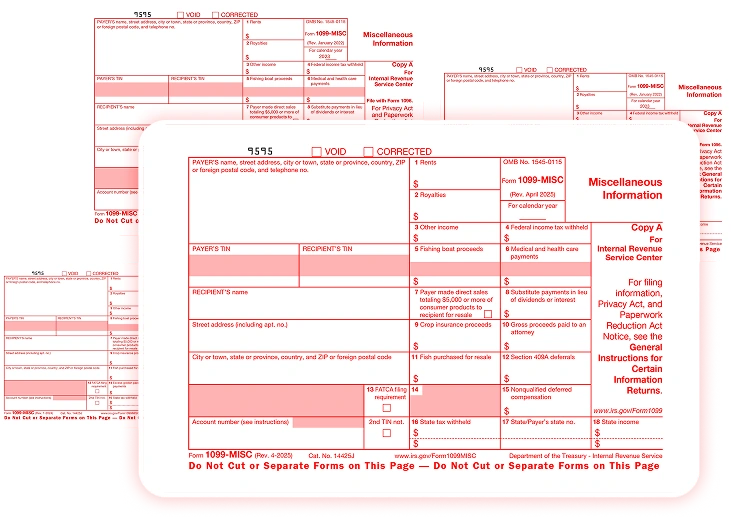
How It Works?
Step 1

Enter Your Information
To generate a correct and compliant 1099 MISC form, make sure to enter accurate payer and recipient information, payment details, contact details, and mailing address.
→
Step 2

Preview Your Document
During the preview step, just review all payment details and tax calculations to ensure your 1099 form online is accurate and compliant before proceeding.
→
Step 3

Download Document Instantly
With our 1099 form generator, you can instantly access your tax information and download your 1099 MISC form PDF from StubCreator.
What is a 1099 Form?
A 1099 form is an IRS document , that is used to report income that didn't come from a regular employer salary. If you are independent contractor or you've earned money through freelance work, rental income, or stock dividends, it usually gets reported this way instead of through a W-2.
What Is 1099 MISC Form?
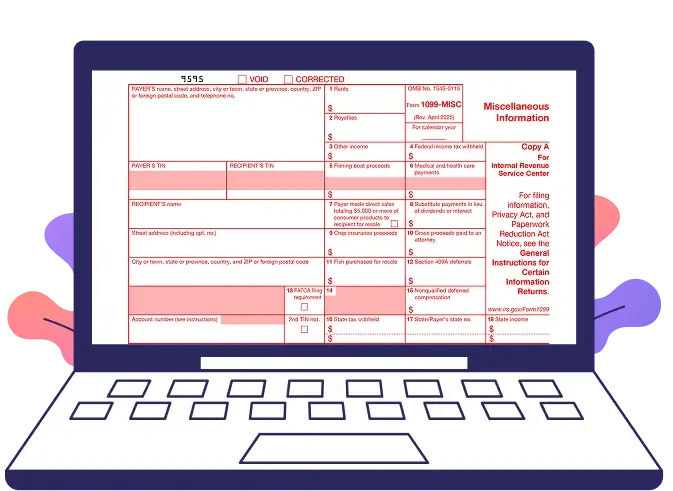
A 1099-MISC form is a one of the type of 1099 form , it is used to report miscellaneous income ; such as rent, royalties, prizes, awards, or payments made to an attorney.
If a business pays someone $600 or more in any of these categories during the year (or $10 or more for royalties), they're required to send that person a 1099-MISC.Making it easily accessible, the 1099-MISC Form is available with Stubcreator.com. You can feasibly download and use the printable 1099 Form at low prices.
There isn't just one version of 1099 form, either depending on how the money was earned, you might receive a 1099- MISC, 1099-NEC, 1099-INT, a 1099-DIV, or one of several other types.
Businesses that also need accurate income documentation for contractors often rely on a reliable paystub creator to maintain proper payroll records alongside tax forms.
Who Needs to File a 1099?
The 1099 MISC form is used for anyone working for you but who cannot be categorized as an employee. If a person who is working for you but cannot be categorized as an employee still earns more than $600, then you need a 1099 MISC form.
If you are the one who makes royalty income, then you surely need a 1099 MISC form. If your royalty income is more than $10, you must surely need to file a 1099 MISC form. IRS 1099 MISC form is used for anyone working for you but one who cannot be categorized as an employee. If a person who is working for you cannot be categorized as an employee and still earns more than $600, then you need a 1099 MISC form.
Before finalizing payroll records, many businesses prefer reviewing a free check stub template to preview how the paystub will appear before creating it for contractors or employees.
How to Fill Out a 1099 Form?
Filling out Form 1099-MISC is simple. Follow these five quick steps.
1
Add Payer Details
Enter your name, business name (if applicable), address, and Tax ID (EIN or SSN).
2
Add Recipient Details
Enter the recipient's name, address, and Tax Identification Number.
3
Add Payment Information
- Box 1: Rent ($600+)
- Box 2: Royalties ($10+)
- Box 3: Other Income
- Box 6: Medical Payments ($600+)
- Box 10: Attorney Payments ($600+)
4
Add Tax Withheld
Enter any federal or state tax withheld, if applicable.
5
Review & Send
Review everything and send the required copies to the recipient and IRS.
Tip: A 1099 generator helps reduce errors and speeds up the filing process.
Do You Need to File a 1099-MISC? (Exceptions to Know)
Most 1099-MISC forms are issued to individuals rather than corporations. However, there are a few exceptions where filing is still required.
When You Must File
- Cash purchases for fish resale
- Substitute payments instead of dividends or tax-exempt interest
- Medical and healthcare payments
- Gross proceeds paid to an attorney
When You Don't Need to File
- Personal payments not related to your business
- Most payments made to corporations
- Purchases of goods, freight, storage, or mobile phone services
- Rent paid to a property manager or real estate agent
- Employee wages and travel reimbursements
- Life insurance costs
- Payments to tax-exempt organizations
- HFA Hardest Hit Fund payments
- DOJ public safety officer compensation
- Government survivor benefits
- Wrongful imprisonment compensation
Note: If your payment falls into one of these categories, you typically don't need to issue a 1099-MISC. When unsure, check the latest IRS instructions.

1099 Form Independent Contractor Agreement
It is required to dispatch a copy of the IRS 1099 Form Independent Contractor Agreement to the respective personnel by January 31 of the year following the payment. Also, it is to be noted that independent contractors may have their own employees or may hire independent contractors under them. In such cases, they are expected to be aware of their tax responsibilities as well as filing and reporting requirements.
Steps to Generate 1099 MISC Form Online
With the help of StubCreator, you can easily generate print-ready, filling-ready 1099 MISC forms.
1
You can fill out the 1099 MISC form here. You can get an overview of 1099 MISC here.
2
Check the preview. If it’s as expected, you can surely proceed towards checkout.
3
By using PayPal, you can get this done within minutes for just $6.99. You will receive a print-ready copy in your email, which you can use for filing tax returns.
What Is a 1099 MISC Form Used For?
A 1099-MISC form is used to report miscellaneous payments made to someone who isn't a regular employee; payments they'll need to include when filing their own taxes. The IRS uses this form as a cross-check: it compares what the payer reports against what the recipient reports on their tax return, making sure nothing gets left out.
In short, it keeps both sides accountable. The business or individual making the payment has a record they've reported it, and the person receiving the payment has documentation to match against their own filing.
Why Choose Our 1099 Online Generator?
Most people don't fill out tax forms every day, which is exactly why we built this 1099 form generator. Fillable 1099 form is easy to use, you just need to enter your business details, the recipient's info, and the payment amounts ; that's it.
StubCreator handle the formatting and the math, so within a couple minutes you've got a finished 1099-MISC sitting in your downloads, ready to send or file.
No spreadsheets, no second-guessing your calculations, no digging through IRS instructions to figure out which box something belongs in.
Ready to Create Your 1099-MISC Form?
Get an accurate, IRS-ready 1099-MISC form in minutes
no tax expertise needed.