.png)


 Chat with us now!
 Send Email!



A pay stub is more than just an earnings record; it provides a detailed breakdown of employee wages, taxes, deductions, and take-home pay as well.
Whether you’re an employee reviewing your paycheck, a business owner checking employees’ payroll data, or a freelancer tracking income, understanding how to read a pay stub is essential!
In this guide, we’ll explain every section of a pay stub in very easy terms, including gross pay, deductions, taxes, net pay, and year-to-date totals. By the end, you’ll know exactly what a pay stub looks like and learn why using a reliable paystub creator can help you to create pay stubs easily for both employers and employees.
What is a Paystub and Why is it Important?
A pay stub is an earnings document that provides a detailed breakdown of an employee’s earnings and deductions for a specific pay period.
The paystub accompanies a paycheck or direct deposit and shows important payroll information such as taxes withheld, gross wages, deductions, and net pay.
Today, everyone can easily generate professional pay stubs, making payroll documentation faster and more convenient.
Importance Of Paystub
Paystub serves as an important financial record for both employees and employers.
Pay stubs are used as proof of income for renting apartment, applying for loans, filing taxes, or verifying employment.
Employers use pay stubs to maintain transparent payroll records, while employees use them to track their earnings and deductions.
- For employees, pay stubs make it easy to check that wages, overtime pay, bonuses, and deductions have been calculated correctly.
- For employers, maintaining accurate pay stub records helps support payroll transparency, simplify recordkeeping, and resolve payroll-related questions or disputes.
Pay Stub Meaning in Simple Words
In simple terms, a pay stub is a summary of how much money you earned. You can get the detailed information on how much was deducted from your paycheck before you received it.
Think of it as a receipt for your wages. It explains:
- How much you earned
- Federal, state, and local income taxes withheld
- Benefit deductions such as health insurance
- Your final take-home pay
Pay Stub vs Paycheck Stub vs Check Stub
The terms pay stub, paycheck stub, and check stub are usually used for the same purpose. They all refer to the same payroll document; there are slight differences in how people use these terms.
- Pay Stub: The most common term used for a wage or earnings statement.
- Paycheck Stub: Refers to the pay stub attached to a physical paycheck.
- Check Stub: An older term that was used when employees were paid by paper checks.
Regardless of the name, each document contains the same essential information.
Is an Earnings Statement a Pay Stub?
Yes. An earnings statement is essentially another name for a pay stub. A wage statement or pay stub provides details about an employee’s compensation for a specific pay period.
Some employers prefer the term “earnings statement,” not pay stub, because it sounds more formal, especially when payroll records are delivered electronically.
What Important Information Is Available on a Pay Stub?
Whether you receive a paper paystub or an electronic pay statement, most pay stubs include essential payroll details, mentioned below.
1. Employee & Employer Details
Employee information on a pay stub often includes full name, address, employee ID number or Social Security number.
Common details include:
- Employee name
- Employee Identification Number
- Employer name
- Company address
- Job title or department (if included)
2. Pay Period & Pay Date
A pay stub shows the exact period covered by the payment. The pay period helps employees understand when their work hours were calculated.
This section usually includes:
- Pay period start date
- Pay period end date
- Pay date
3. Gross Pay & Net Pay
Gross Pay is the total amount earned by an employee or independent contractor before any taxes are removed.
Gross pay should equal hours worked multiplied by rate plus bonuses or commissions.
It may include:
- Salary
- Overtime earnings
- Bonuses
- Commissions
- Other compensation
Net Pay is the final amount you receive after all taxes and deductions are taken out. It is also known as take-home pay.
4. Pay Stub Deductions
Deductions are amounts removed from gross earnings before the final payment. They may include:
- Federal income tax
- State and local taxes
- Social Security and Medicare taxes
- Retirement contributions
- Health insurance premiums
- Other authorized deductions
5.Year-to-Date (YTD)
Year-to-Date (YTD) amounts show the total earnings and deductions accumulated from the beginning of the year.
Year-to-Date (YTD) is the running total of earnings, taxes and deductions for the calendar year.
YTD information may include:
- Total gross earnings
- Total taxes withheld
- Total deductions
- Total net pay
By understanding each section of a pay stub, employees can confidently review their earnings.
How to Read a Pay Stub Step by Step
Learning how to read a paycheck stub helps employees understand exactly how their earnings are calculated! While pay stub layouts may vary depending on predefined paystub template, most include the same key sections.
A clear understanding of your pay stub allows you to check payroll errors, track your income, and keep accurate financial records.
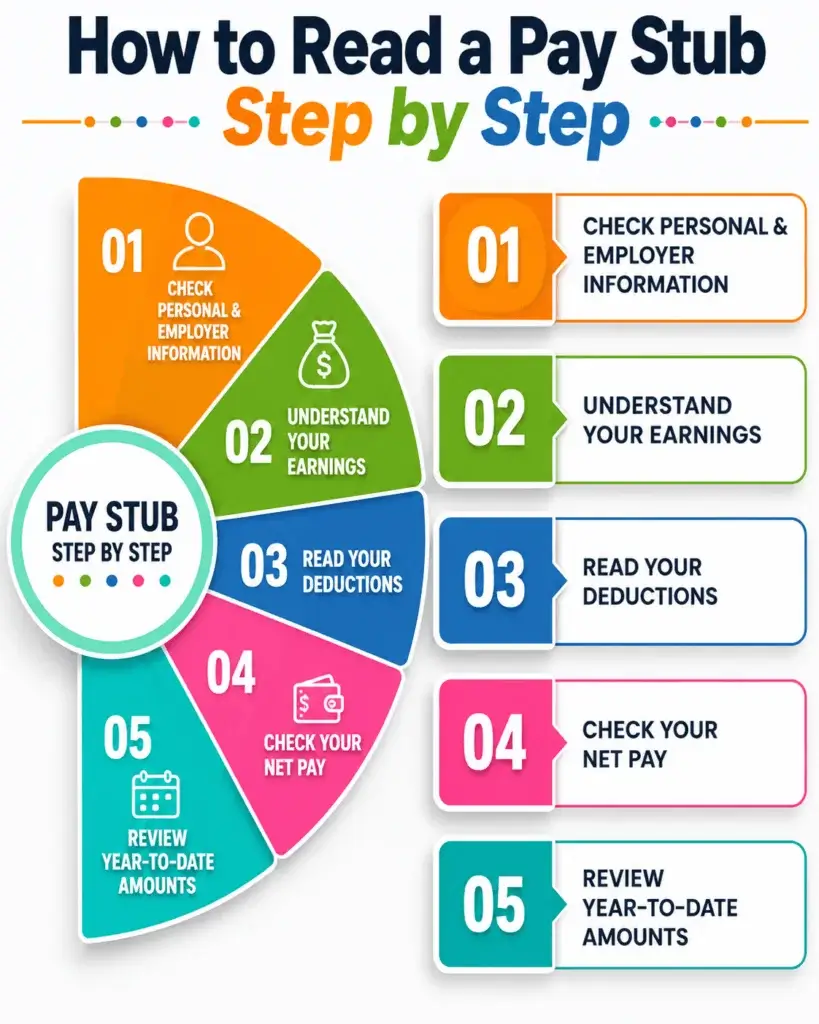
Step 1: Check Personal & Employer Information
You need to start reading by checking basic details listed at the top of your pay stub.
This section confirms that the payment belongs to you and shows which employer issued the payment.
You may find:
- Employee name
- Employee ID or payroll number
- Employer name and address
- Pay date
- Pay period dates
Checking this information first ensures you are reviewing the correct pay statement.
Step 2: Understand Your Earnings
The earnings section explains how your total pay was calculated before deductions were removed. This is usually shown as your gross pay.
Your earnings may include:
- Regular wages or salary
- Hours worked
- Hourly pay rate
- Overtime pay
- Bonuses or commissions
- Paid time off (PTO)
For hourly employees, the pay stub often shows the number of hours worked and the rate paid for each type of work.
Step 3: Read Your Deductions
Deductions are amounts taken out of your gross pay before you receive your final payment. Reviewing this section helps you understand where your money is going.
Common deductions include:
- Federal income tax
- State and local taxes
- Social Security and Medicare taxes
- Health insurance premiums
- Retirement contributions
- Other authorized deductions
Some deductions reduce your taxable income, while others are taken after taxes have already been calculated.
Step 4: Check Your Net Pay
Net pay is the amount you actually receive , check all the deductions and last amount you have received.
The calculation is usually:
Gross Pay – Taxes – Deductions = Net Pay
This amount should match the payment you receive through direct deposit.
Step 5: Review Year-to-Date Amounts
Year-to-Date (YTD) figures show the total amount you have earned and the deductions collected from the beginning of the year until the current pay period.
YTD information may include:
- Total gross earnings
- Total taxes withheld
- Total deductions
- Total net pay
Reviewing YTD totals throughout the year makes it easier to prepare for tax filing and compare your payroll records with tax documents.
By following these steps, you can easily understand your payroll check stubs and make sure your earnings, deductions, and payments are accurate.
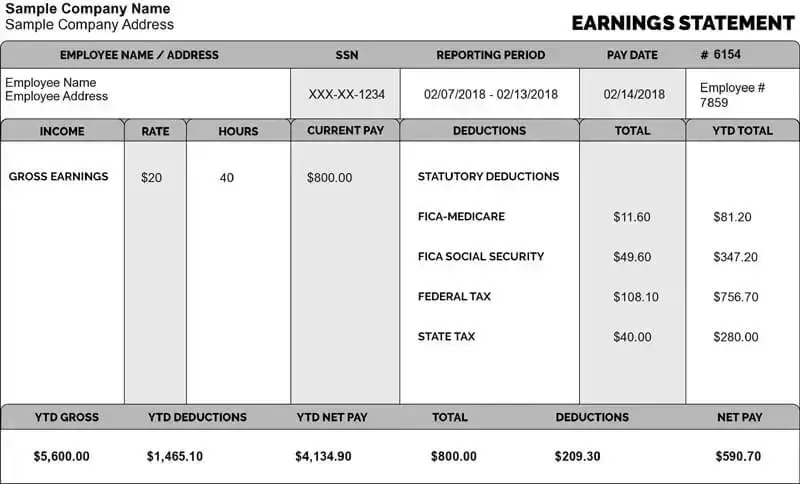
What Does a Pay Stub Look Like?
How to Get A Pay Stub?
Many employers provide digital pay statements through payroll systems or online payroll portals, while others may issue them from external sources. There are several ways to get a pay stub when you need one.
How to Get Pay Stubs From Your Employer?
The easiest way to get your pay stubs is to get them from your employer or payroll department.
You can get pay stubs by:
- Asking your HR
- Checking your employee portal
- Reviewing payroll emails
- Requesting printed copies
How to Get Pay Stubs Online?
Many employers use online payroll platforms where employees can access their pay stubs anytime. For that,
- Log in to your company’s payroll portal.
- Navigate to the payroll section.
- Select the pay period you need.
- Download or print your pay stub.
How Can I Create a Paystub Online?
You can create a paystub online by using tools like a pay stub generator.
Enter the employer and employee details, pay period, pay rate or salary, hours worked, earnings, taxes, and other deductions. The tool then calculates gross and net pay and generates the paystub for download or printing.
How to Get Pay Stubs If You Are Self-Employed
Self-employed individuals mostly don’t receive traditional pay stubs because they do not have an employer. However, they can still create income records to document their earnings.
Self-employed workers can use:
- Bank statements
- Invoices records
- Profit and loss statements
- Tax documents
A paystub generation tool such as StubCreator to generate paystub based on their earnings.
Having organized income records helps self-employed individuals prove earnings.
Conclusion
Understanding how to read a pay stub helps you verify your earnings, track deductions, monitor taxes, and ensure your payroll information is accurate. Whether you’re an employee reviewing your earning statement, an employer managing payroll records, or a self-employed professional documenting income, knowing how to interpret each section of a pay stub is essential.
FAQs About Pay Stub:
1) What information shows up on a pay stub?
A pay stub typically includes details of employee and employer, pay period dates, deductions, gross pay, taxes withheld, net pay, and YTD totals.
2) Is pay stub the same as paycheck?
No. A paycheck is the actual payment you receive, while a pay stub is the earning document that explains about paycheck.
3) Is a pay stub proof of payment?
Yes, a pay stub can serve as proof of income for loans, apartment etc.
4) How can I get my paycheck stubs online?
You can usually access your pay stubs through your employer’s payroll portal or self service platform.
5) How can I get my pay stubs without contacting my employer?
Check your company’s online payroll system or payroll emails, or employee portal where electronic pay stubs are stored.
6) What can I use if I don’t have a pay stub?
You can use bank statements, W-2 forms, tax returns, direct deposit records, or income statements instead of paystub.
7) How do I look up my pay stubs?
Log in to your employer’s payroll portal and navigate to the payroll, earnings, or pay history section to view past pay stubs.
8) How do I get my check stubs?
You can obtain check stubs from your employer, online payroll account, or by using a paystub generator tool if you need documented income records.
9) Where can I find reliable information about pay stubs online?
Reliable pay stub information is available from official sources such as the IRS, U.S. Department of Labor, and your state’s labor or tax agency.
10) What are the common terms used in pay stubs?
Common pay stub terms include gross pay, regular hours, net pay, overtime, deductions, federal income tax, Social Security, Medicare, state tax, benefits, and year-to-date (YTD).
11) Are there any online tools to help me read and interpret my pay stub?
Yes. Online pay stub calculators, tax withholding tools, and payroll guides can help you understand gross pay, taxes, deductions, and net pay.
Also Read:
How Do I Create Pay Stubs for Caretaker?
How to Verify the Authenticity of a Pay Stub Online?
How Long to Keep Pay Stubs: A Guide for Businesses & Employees