.png)


 Chat with us now!
 Send Email!



A direct deposit slip is the form that authorises an employer (or other payer) to deposit money straight into a bank account.
Before diving into the finer details, it helps to tackle a widespread misunderstanding right away: what people casually call a “deposit slip” in this context is almost never the paper slip you grab at a bank teller counter when handing over cash or physical checks. Instead, it is functionally a direct deposit authorization form.
Knowing how this document works, what specific information is required, and how your banking information is processed will ensure your paycheck arrives on time with no surprises. The guide below covers everything you need to know from understanding routing numbers to setting up automatic split deposits across multiple financial accounts.
What Is a Direct Deposit Slip?
A direct deposit slip is a one-page authorization form that collects an employee’s personal identification information and financial account numbers so that an organization can route net earnings electronically through the ACH direct deposit network.
When you start a new job or update your existing payroll settings, your employer needs written legal permission to push funds into your account. Without this document on file, payroll departments cannot initiate automated transfers.
Clearing Up the Terminology Confusion
It is easy to see why confusion arises around this document. If you walk into a traditional brick-and-mortar bank branch, a teller might hand you a small paper deposit slip. That slip is designed for in-person transactions where you deposit physical cash or endorsed paper checks into your account right at the counter.
In contrast, a payroll direct deposit slip (or authorization agreement) is an internal administrative document. It does not transfer money on the spot. Instead, it serves as a standing instruction protocol for your company’s payroll processor.
When Do You Need to Fill One Out?
You will generally see this document at certain career or financial milestones:
- New Employee Onboarding: When you begin a new job, you’ll typically need to fill out a direct deposit form and tax withholding forms (such as Form W-4) as well.
- Moving Financial Institutions: If you are opening a new checking or savings account, you will need to update your payment routing information with your current employer.
- Changing Account Allocations: If you would like to split your earnings between a high-yield savings account and a checking account for day-to-day transactions, you’ll need to provide new distribution instructions.
- Getting Started on Contractor Work: Freelancers and independent contractors who are setting up regular electronic payouts with clients or digital payment platforms often fill out similar authorization templates.
What Information Goes on a Direct Deposit Slip?
Payroll software must have all the right data points to allow money to flow smoothly across the Automated Clearing House (ACH) network. Pay delays can occur when an automated transfer is not completed due to a missing number or an unreadable signature.
The following table breaks down the standard fields found on a modern direct deposit authorization form:
| Field Name | Description | What You Should Enter |
| Full Legal Name | Your complete legal identity | Enter your first, middle, and last name exactly as they appear on your bank account and tax documents. |
| Employer / Employee ID | Your workplace identification | Enter your assigned worker ID, payroll number, or department code provided by HR. |
| Bank Name | Your financial institution | The official commercial name of your bank, credit union, or online banking entity. |
| Routing Number | 9-digit financial identifier | The specific American Bankers Association (ABA) routing code assigned to your bank branch. |
| Account Number | Unique account sequence | Your specific checking or savings account number where funds will land. |
| Account Type | Destination classification | A clear checkmark or selection indicating either a “Checking” or “Savings” account. |
| Deposit Allocation | Pay distribution instructions | Specify whether 100% of your net pay goes here, or state a specific dollar/percentage split. |
| Signature & Date | Legal authorization | Your physical wet signature or an authenticated electronic signature accompanied by the current date. |
How to Fill Out a Direct Deposit Form
Filling out this form is simple and usually takes less than five minutes once you have your bank details in front of you. Taking a methodical approach prevents processing delays and keeps your money moving smoothly.
Step-by-Step: Completing the Form
- Get your official bank details: Before sitting down to finish the document, locate your routing and account numbers. These are available on the back of a personal paper check, by logging into your bank’s official mobile app, or by pulling up a recent electronic bank statement. Do not guess or rely on memory.
- Fill in Personal and Company IDs: Enter your full legal name, permanent residential address, contact phone number and Social Security number (or employee ID) in the fields below. Enter the official business name of your employer so the payroll processor can cross-check the file.
- Choose Your Target Account Type: Find the checkboxes for classifying the account. Please indicate whether the funds are to be deposited into a checking or savings account. Marking both without clear instructions can cause system errors.
- Set your deposit allocation: Want to put all your winnings in one place? Type in “100%” or select the “Full Deposit” option. If you want to split your paycheck up into multiple places, then you want to enter the exact percent or dollar amount that you want to go into this particular account.
- Submit any verification documents needed: Some organizations will need proof of ownership, a physical or digital document, before they will activate automated payments. A voided check for direct deposit or a signed bank account verification letter, if applicable.
- Authorization: Sign and date: Check each entry for typos very carefully. Once confirmed, please sign Your Legal Name and the current date. Accounting and HR departments are unable to process unsigned forms.
- Prior to the Payroll Cutoff Date: Send the completed form to your HR representative, payroll department, or secure online portal. And watch the processing times. Turn in your paperwork a day after the payroll deadline and you may still get your next paycheck in the mail as a paper check.
Where to Find Your Routing and Account Numbers
Knowing where to look for your financial codes eliminates guesswork. Your bank relies on two primary strings of numbers to route funds across the financial system:
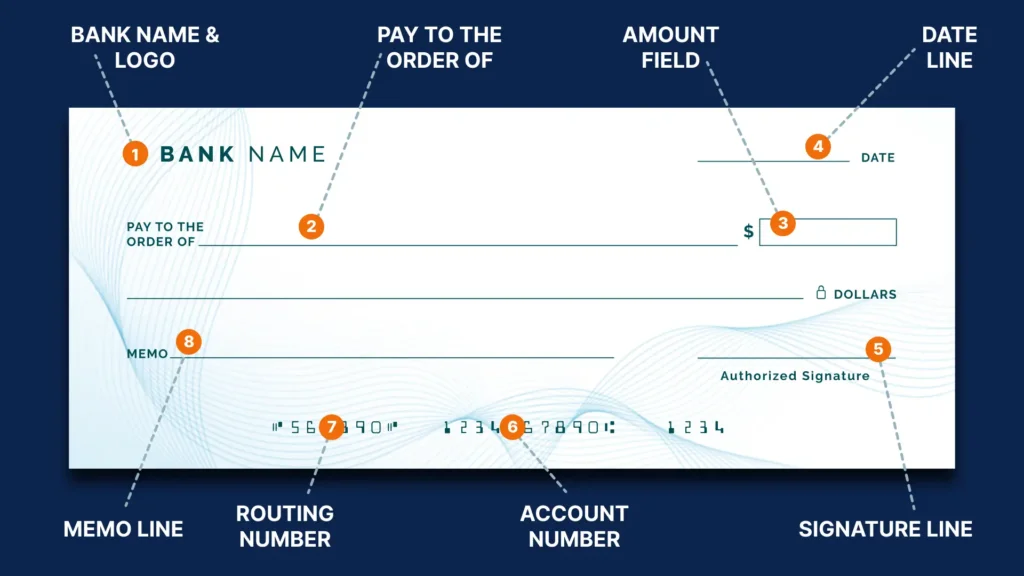
Routing Number, Account Number, Check Number
- On a Personal Paper Check:
Look at the bottom edge of any check from your booklet. You will see three distinct sets of numbers printed in magnetic ink:
-
- Routing Number: The first 9-digit sequence on the far left, flanked by symbol brackets (⑆).
- Account Number: The second string of digits, usually located right in the middle.
- Check Number: The shortest sequence on the far right, which matches the check number in the upper right corner.
- Inside Your Bank’s Mobile App or Web Portal:
Sign in to your online banking site. Click on the details page of your main checking or savings account. Today, most banking apps have a button that says something like, “Account Details,” “Routing Information,” or “Direct Deposit Info,” that will show your numbers clearly.
- On a Monthly Bank Statement:
Open a recent PDF or paper bank statement. Your account number is usually listed near the top header alongside your personal profile information. Many banks also print their master ACH routing code near the summary section.
Caution: Never guess your routing or account numbers. Transposing even a single digit will cause your electronic deposit to fail, leaving your funds stuck in clearinghouse limbo and delaying your pay by several business days.
Do You Need a Voided Check Too?
It is very common for payroll departments to request a voided check for direct deposit alongside your completed authorization form.
Why do employers ask for this? The reason comes down to human error. When HR staff manually type long account numbers into payroll software, mistyped digits can happen. A physical check acts as a primary reference document, showing the exact routing sequence printed directly by your financial institution.
How to Prepare a Voided Check Correctly
If you need to supply one, take a fresh check from your checkbook and write the word “VOID” in large, clear capital letters across the front. Use a thick blue or black marker so the text covers the payee line, amount line, and signature area.
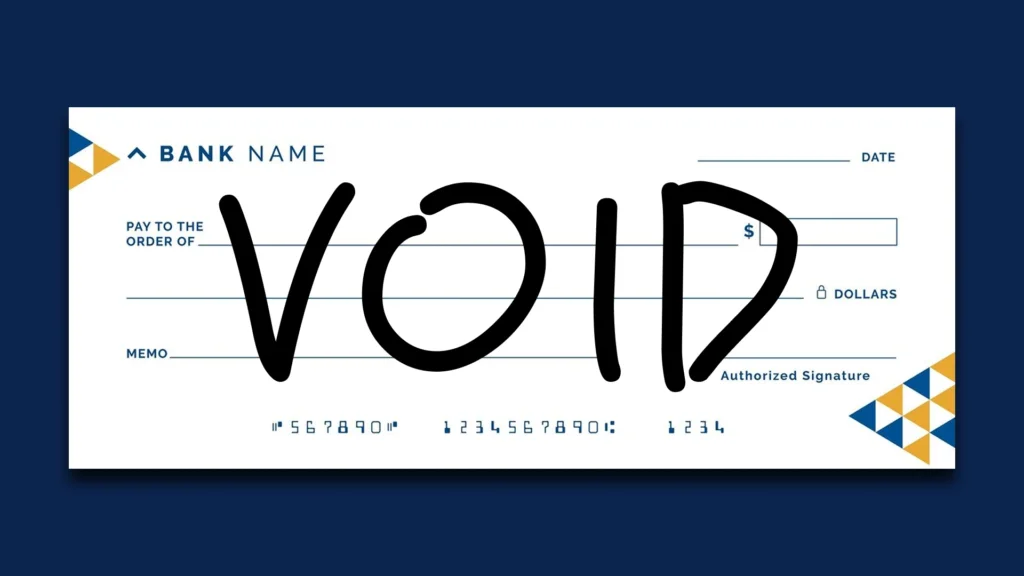
Be careful not to cover or smudge the magnetic numbers at the very bottom. Once it is marked, the check is safe to submit to your HR department and can not be cashed or deposited by anyone.
To learn more about alternative verification methods, you can read about what a voided check is and how you can request digital alternatives from your bank if you don’t use paper checks in physical form.
Direct Deposit Slip vs. Direct Deposit Form vs. Voided Check
Because people often use these terms interchangeably, it helps to review how they differ in practice:
| Feature / Detail | Direct Deposit Slip / Form | Voided Check Bank | Verification Letter |
| Primary Purpose | Legal authorization to transfer funds electronically | Visual verification of account and routing numbers | Official bank-certified proof of account ownership |
| Who Supplies It? | Provided by your employer or payroll system | Pulled from your personal checkbook | Issued by your bank teller or mobile app |
| Key Information | Names, account types, allocations, signature | Routing number, account number, check number | Bank letterhead, account holder name, account/routing details |
| Is It Mandatory? | Yes, required for direct deposit setup | Often optional if a bank letter is provided | Required if paper checks are unavailable |
Splitting a Direct Deposit Across Multiple Accounts
One of the best things about electronic payroll systems is that they can automate your savings with a split direct deposit. You can also set your authorization form to automatically distribute your pay into different buckets, so you don’t have to shuffle money between accounts every payday.
Common Ways to Divide Your Earnings
- % Split: Payroll can send part of your pay to one account and the rest to another. As an example: –
- 80% goes into your main checking account for bills, rent, and other daily expenses.
- 20% goes directly into an investment account or a high-yield savings account.
- Fixed dollar split: You can also opt for a certain dollar amount to be taken out before the rest goes into your main account:
- $300 will be deposited directly into a savings account for emergencies.
- The net amount was deposited to your regular checking account.
When setting up a split deposit, always make sure your total instructions add up to the correct amount. Percentage allocations must total exactly 100%, and fixed-dollar splits must leave enough balance to cover your primary account needs. If the math doesn’t balance, payroll systems will reject the form.
Common Mistakes to Avoid
A single administrative mistake can delay your paycheck. Keeping an eye out for these frequent errors can save you time and hassle:
- Change Routing and Account Numbers: The 9-digit routing number always identifies your bank. Your acct number identifies your acct. If you put electronic transfers in the wrong order, it’s one of the most common reasons they fail.
- Wire Routing vs ACH Routing Confusion: Some financial institutions have different routing numbers for incoming domestic wire transfers versus standard ACH direct deposit processing. You will have declined deposits. The wire routing number can be used for payroll.
- If the account type is not selected: Payroll systems will ask whether the account is a checking or savings account. If you leave this blank, HR will put the setup on hold until they can confirm those details with you.
- Forgetting to Sign and Date the Document: Unsigned paperwork cannot be legally processed. Even if all your bank details are accurate, an unsigned form will sit on an administrator’s desk until you sign it.
- Submitting Details for Closed Accounts: If you recently changed banks, make sure your old account stays open until your first paycheck lands in your new account. Submitting closed account details will cause your payment to bounce back to your employer’s bank account.
- Missing Payroll Submission Cutoffs: Payroll departments process disbursements days before actual paydays. Submitting your form late in the pay period means your update won’t take effect until the following cycle.
Where to Get a Direct Deposit Slip
Whether or not you need this form depends on your job and how your workplace is set up:
- From the HR department or website of your employer: Many companies offer employee self-service portals like ADP, Workday, or Paychex that let you download PDF forms or use other digital options.
- Straight from the bank: The authorization forms will be pre-filled on the websites and mobile apps of most major banks. The forms come with the bank routing number and address printed on them, and all you have to do is fill in your name, account number and signature.
- Using Tools for Online Documentation: If you’re an independent contractor, a freelancer, or a small business owner who handles your own paperwork, a good online pay stub generator can help you keep better records.
There are a lot of platforms like StubCreator that provide a variety of documentation tools. They also have clean pay stub templates that include deposit slips built into the standard earnings statement. It enables self-employed people and small teams to keep professional, organized payroll records in minutes.
Key Takeaways
- A direct deposit slip is more formally called a direct deposit authorization form and is used to authorize electronic transfers of payroll.
- Required details include your full legal name, bank name, account type, account number, and 9-digit ACH routing code.
- If you have a paper check, your routing and account numbers are on it. If not, they are on your bank statement or the mobile banking app.
- Some employers may request to see a voided check for direct deposit or a bank account verification letter to visually check account numbers.
- Split deposits are set up so you can automatically deposit your net income into multiple checking and savings accounts.
- Double-check your numbers and submit your completed form well in advance of payroll deadlines to avoid check delays.
FAQ's
Is a direct deposit slip the same as a voided check?
+
No, they are two different functions in the payroll setup. A direct deposit slip is the actual legal authorization form you fill out and sign to authorize your employer to electronically transfer money. A voided check is simply a blank check with the word "VOID" on it that you attach to the form so HR can see your routing and account numbers.
Where do I find my routing and account numbers?
+
You can easily find both numbers printed along the bottom left edge of a personal paper check. The first 9 digits are your bank’s routing code, then your individual account number. You can also find these details by logging into your online account on your bank’s official mobile application, going to your online account settings or viewing your latest bank statement.
Can I split my direct deposit between two bank accounts?
+
Yes, most employer payroll systems allow you to split your net earnings between two or more accounts. You can divide your pay by assigning a certain percentage (for example, 80% to checking and 20% to savings) or by putting a fixed dollar amount into one account and the rest into another. Just make sure your totals add up right.
What happens if I make a mistake on my direct deposit slip?
+
If you enter an incorrect routing or account number, the Automated Clearing House (ACH) network will reject the transfer. The money will bounce back to your employer's account. Resolving a bounced deposit usually takes several business days, during which your employer will likely issue you a physical paper check while you update your form.
How long does it take for direct deposit to start after I submit the form?
+
Direct deposit takes 1-2 full pay periods to become fully active. As part of this transition, your bank and employer will process a $0.00 test transaction (called a pre-note) to confirm the connection. This check will be made and you might get a paper check for your first paycheck.