.png)


 Chat with us now!
 Send Email!


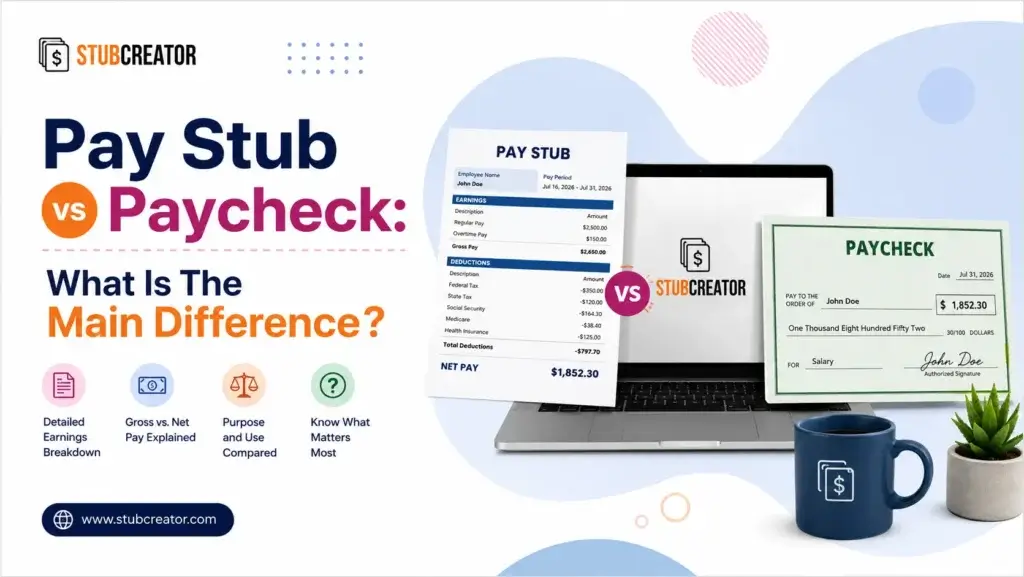
A paycheck is the actual payment, such as cash, a paper check, or a direct deposit that puts money in your bank account. A pay stub (also called a paycheck stub or check stub) is the earning document itemized record attached to that payment. In short: the paycheck is the money, and the pay stub is the math behind the money.
If you’ve ever searched “pay stub vs paycheck” and gotten more confused instead of less, you’re not alone; most people use the two terms interchangeably, and payroll software doesn’t always make the distinction obvious. This guide breaks down exactly what each one is, what information appears on a pay stub, and how to create a pay stub using the paystub generator.
What Is a Paycheck?
A paycheck is the literal method of payment an employer provides to an employee for services rendered over a specified pay period. There is an actual dollar value to it (you can deposit it, cash it, or, if you are going directly into your bank account, the money enters your bank account).
In the past, it was always a paper check in your hands. That is more the exception than the rule today. Less than 10% of U.S. employees now get paid using a paper paycheck; most workers are compensated via direct deposit, with some paid on a payroll card in place of direct deposit funds.
What a paycheck actually shows: Simply one number — your take-home pay, how much you will have left after taxes/deductions have already been taken out.
A paycheck alone isn’t an explanation of how that number was arrived at. Your employer may underpay your overtime or withhold taxes, and the paycheck itself doesn’t tell you that you’d need the pay stub.
Paycheck Payment Methods
- Direct deposit – USDs that have been sent electronically over the ACH network; this is currently the most widely used method.
- Paper check – a physical check (often a tear-off pay stub)
- Payroll card – a prepaid debit card that receives net pay each period, usually offered to unbanked persons
What Is a Pay Stub?
A pay stub – also known as a paycheck stub, payslip, payment stub or check stub is the portion of your paycheck that breaks down what went into your paycheck. It’s the receipt, not the payment!
Pay stub meaning, in plain terms: To break it down very simply, a pay stub is a line-by-line breakdown of the way your employer got from step one to the amount that actually hit your bank account or made it to cash on hand.
If you get paid by direct deposit, you won’t find a paper stub in the mailbox; most employers publish an electronic pay stub to an online payroll portal every pay period. When paid by paper check, the stub is usually perforated and glued to the check.
What Is a Check Stub Used For?
Beyond mere curiosity, a pay stub has several purposes:
- Proof of income for loan applications, apartment rentals and mortgage underwriting.
- Tax preparation assists your year-end checks on your W-2
- Error checking; this option allows you to validate hours, overtime and deductions
- Budgeting provides a detailed breakdown of where your gross income goes
- Maintaining records of benefit enrolments and deductions for retirement contributions and garnishments
Pay Stub vs Paycheck: Key Differences at a Glance
| Aspect | Paycheck | Pay Stub |
| What it is | The actual payment that you get in your account | A record/receipt of that payment/ earning records |
| Monetary value | Yes, can be deposited or cashed | No; informational only |
| Format | Paper check, direct deposit | Paper or electronic/online portal |
| Information shown | Net pay | Gross pay, taxes, deductions, net pay, YTD totals- whole breakdown |
| Purpose | Transfers to the employee | Explains how the pay was calculated |
| Required by federal law? | No, not necessary | Not federally, but most states require |
| Used for | Paying bills, deposits | Proof of income, tax filing, dispute resolution |
What Is on a Pay Stub?
A standard pay stub is divided into discrete sections. Here is what key information is found on a paycheck stub:
1. Identifying Information
- Employer name and address
- Employee name and address
- Pay period
- Pay date
- Pay rate
2. Earnings
- Hours worked (for hourly employees) or salary
- Gross pay – total earnings before any deductions
3. Deductions
Deductions typically fall into two categories:
Mandatory (tax) withholdings:
- State and local income tax
- Federal income tax
- Social Security tax (6.2%)
- Medicare tax (1.45%)
Voluntary deductions:
- Pre-tax: traditional 401(k) contributions, health insurance premiums, HSA/FSA contributions
- Post-tax: Roth 401(k) contributions, union dues, wage garnishments
4. Net Pay
The final number, what actually gets deposited into your account. This is calculated as:
Gross Pay − Taxes − Deductions = Net Pay
5. Year-to-Date (YTD) Totals
Pay stubs don’t only show pay for a certain period; however, many also have a running YTD column that shows gross pay, taxes and deductions accumulated since Jan. Especially for tracking your yearly earnings and checking your W-2 during tax season.
Payroll vs Paycheck: What’s the Difference?
These are often confused with each other (as it frequently happens), but they work at different levels:
- Payroll is the system or process a company uses to manage its employees’ financial records – including, but not limited to: hours worked and paid, tax deductions, IRS filings, and paychecks.
- A paycheck refers to the individual compensation an employee receives as an output of the payroll process.
Consider payroll the engine; the paycheck is one of many trips taken by that car. Related, a payroll check is another name for a paycheck issued through an official payroll (e.g., not cash) and is generally used interchangeably with “paycheck.”
How to Make Payroll Check Stubs?
It is common knowledge that employers and small business owners who are required to generate correct pay stubs typically have three avenues for doing so:
- Payroll software – solutions such as Fingercheck, Gusto, or QuickBooks Payroll calculate gross pay, tax withholdings and net pay automatically, then produce a compliant pay stub for every employee each payroll period.
- Accountant/Bookkeeper – depending on the size of your team, a bookkeeper can prepare stubs manually, but this may increase the risk of calculation errors.
- Pay stub templates/ generators – safe for contractors or very small operations but dangerous for an ongoing payroll because they do not automatically update to reflect tax law changes in individual states.
For any organization that hires employees, automated payroll software provides the most reliable method to ensure pay stubs are accurate, compliant and uniform throughout each pay period.
The Bottom Line
The paycheck is the money. The pay stub is the paper trail for the money.
On payday, your employer determines how much you made before taxes and deductions (gross pay), then deducts the appropriate amounts that hit your paycheck bank account, while the pay stub keeps a record for each step on the way there so that you know it’s accurate. Both are important for understanding early warning on payroll errors, proper documentation to apply for credit, and managing your own finances.
FAQs:
1) Is a pay stub the same as a paycheck?
No. A paycheck is the payment that you actually receive. A pay stub is the detailed breakdown of how your gross income was reduced by taxes and deductions to reach your net salary.
2) What is a paycheck?
A paycheck is the payment an employer makes to an employee for work performed.
3) What is a check stub?
Another name for a pay stub, also known as a check stub, is the itemized breakdown that is attached to (or comes with) the actual paycheck.
4) Paystub or pay stub – which is correct?
Both are accepted. “Pay stub” (two words) is the more common and standard spelling, but “paystub” (one word) is widely used informally and casually searched.
5) Do I need a pay stub if I already have my paycheck?
Yes. The paycheck itself only shows what you actually come home with. When you need to prove your income, settle a pay dispute, apply for a loan or file taxes, a pay stub is required.
6) Can you get a paycheck without a pay stub?
Yes, in certain situations, such as if the employee is paid cash or if they are paid through a system where stubs are not created automatically. Most states, however, impose a legal obligation on employers to provide some type of itemized pay statement.
7) How do I get my pay stubs?
Current and historical pay stubs are generally available to employees via their employer’s online payroll portal. If you do not have access, obtain copies directly from your HR or payroll department.