.png)


 Chat with us now!
 Send Email!


Accessing your RGIS pay stubs is crucial to keeping track of your finances and ensuring you are aware of your earnings. If you’re an employee of RGIS, an international company that provides retail and inventory services and retail service providers, you’ll need to know how to access the pay stubs you’ve received.
In this guide, we will guide you to get your paystub by using the RGIS employee portal sign in method. There are several steps you need to follow to get your paystub easily.
Generate professional pay stubs for free with our reliable free paystub generator designed for businesses of all sizes.
What is RGIS?
RGIS stands for Retail Grocery Inventory Services. It is a firm that specializes in inventory management, stock management, and supply chain services for supermarkets, warehouses, retailers, and other businesses.
For employees, RGIS is often known as an employer that hires:
- Inventory Associates
- Inventory Counters
- Team Leaders
- Supervisors
- Retail Auditors
RGIS is an international inventory and retail services corporation that helps businesses track, count, and manage their stock appropriately.
How to Get RGIS Pay Stubs?
RGIS Employee Portal:
RGIS provides its employees access to pay stubs through Paperless Employee, a third-party self-service platform.
Here’s how to get your pay stubs online through an RGIS employee portal.
Registration:
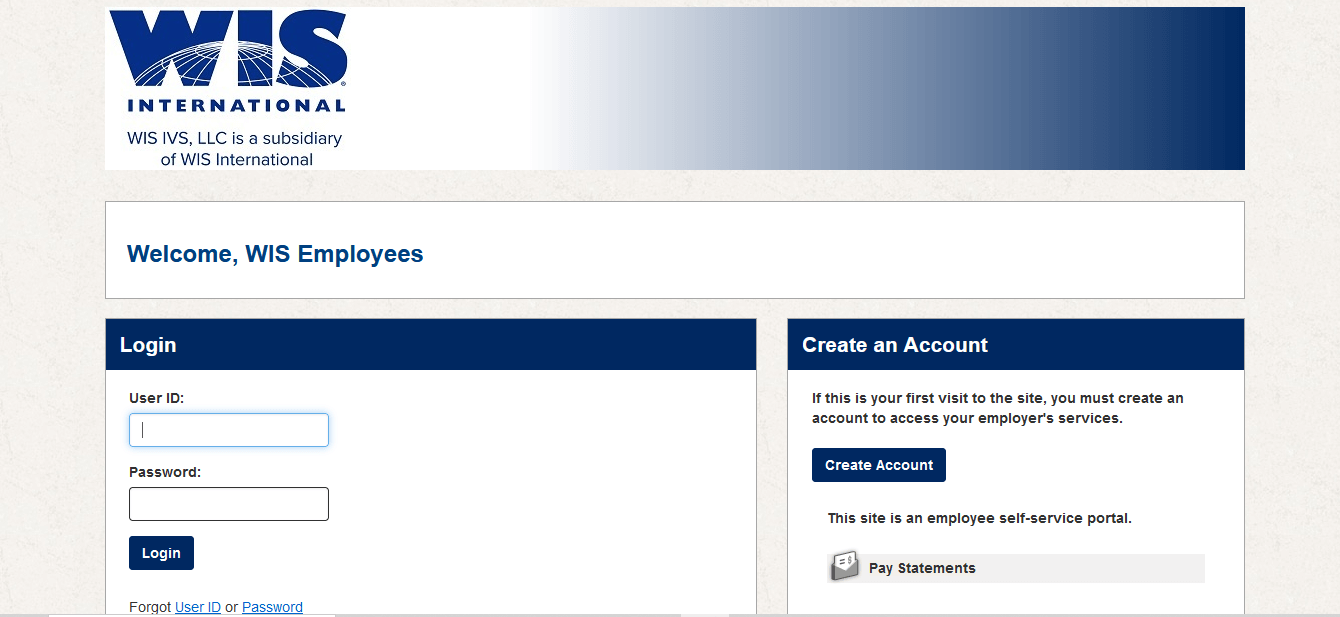
If this is your first visit, go to www.paperlessemployee.com/RGIS and click Create an Account. You will need your RGIS Employee ID number, email address, and other basic details to register. Note: Since RGIS is now part of WIS International, the portal may display WIS Employee branding.
Log In:
After registering, return to the paperless employee portal and sign in with your User ID and password. Once logged in, navigate to the Pay Statements section to view your pay stubs.
Download Your Paystubs:
Click on the pay stub you want to view, then download it as a PDF for your records.
Contact RGIS HR or Payroll Department:
Suppose you experience any difficulties on the web portal or would prefer a more straightforward method of contact with the HR department of RGIS or the Payroll department. In that case, They can assist you with finding your pay stubs and answer any payroll-related questions that you may need to address.
Pay Stub Notifications:
RGIS could also send notifications about pay stubs to the email address that you have registered. Keep an eye on your inbox for these emails, which may include hyperlinks for your payslips as well as access instructions.
Mobile App:
The Paperless Employee platform is accessible via a mobile browser on both iPhone and Android devices. Simply open your browser, go to www.paperlessemployee.com/RGIS, and log in with your credentials to view your pay stubs on the go. There is no dedicated RGIS mobile app required.
Payroll Service Provider:
RGIS uses two separate third-party platforms for payroll documents:
- Pay Stubs: Available bi-weekly on Paperless Employee at www.paperlessemployee.com/RGIS
- W-2 Forms: Available through the ADP W-2 portal online, or delivered by US postal mail
If you have trouble accessing either platform, contact RGIS HR directly at humanresources@rgis.com or call 800-826-3250.
Ask Your Supervisor:
If nothing else works, try contacting your manager or supervisor for help. They might be able to assist you in getting your pay stubs or guide you to the right division within RGIS.
How Can a Current Employee Access Their RGIS Paystubs?
Current RGIS employees can usually access their pay stubs through the company’s employee self-service payroll portal. The exact process may vary by location and payroll provider, but it generally follows these steps:
- Go to the RGIS employee payroll or HR portal provided by your employer.
- Sign in using your employee ID, username, and password.
- Navigate to the Payroll, Pay Statements, or Pay Stubs section.
- Select the pay period you want to view.
- Download or print your pay stub as a PDF if needed.
If you do not know the login portal or have trouble accessing your account, contact your RGIS HR department, payroll team, or direct supervisor. They can provide the correct login link, reset your password, or help you obtain copies of your pay stubs.
How Can a Former Employee Access Their RGIS Paystubs?
Former RGIS employees can typically access their pay stubs through the payroll portal they used while employed, provided their account remains active. If online access is no longer available, they should contact RGIS Human Resources or the payroll department to request copies of past pay stubs. Be prepared to verify your identity by providing details such as your employee ID, employment dates, and personal information. Depending on company policy, pay stubs may be provided electronically or by mail.
Use of Paperless Employee Portal To Access RGIS Paystub
RGIS uses Paperless Employee, a third-party self-service platform, to provide employees access to their pay stubs online. Visit www.paperlessemployee.com/RGIS and log in with your User ID and password. First-time users must create an account. Note: As RGIS is now part of WIS International, the portal may display WIS branding. Pay statements are issued bi-weekly and become available on this platform each pay cycle. For W-2 forms, RGIS uses the separate ADP W-2 portal or delivers them by postal mail.
Key Takeaways
Accessing pay statements through RGIS employee pay stub is an essential element of governing your finances as an employer. This RGIS Employee Portal is typically the primary method to retrieve paystubs. Other options, like contacting HR, payroll, notifications of pay stubs, mobile apps, or getting in touch with your supervisor, are also accessible.
If you need proof of income or want to create professional payroll records, a free pay stub generator for companies can help you generate accurate pay stubs quickly and efficiently.
People May Also Ask
1) What are RGIS paystubs?
RGIS Paystub refers to the payroll statement provided to employees of RGIS (Retail Grocery Inventory Service), a company that specializes in inventory and retail auditing services. A pay stub contains details about an employee’s earnings for a specific pay period, including gross pay, hours worked, overtime pay, taxes withheld, deductions, benefits, and net pay (take-home pay).
2) What does RGIS stand for?
RGIs stands for Retail Grocery Inventory Services.
3) How can I access my RGIS paystubs online?
Current employees can typically access their paystubs through the company’s employee payroll portal or HR system using their login credentials.
4) What information is included on an RGIS paystub?
An RGIS paystub usually includes gross pay, net pay, taxes withheld, benefits deductions, pay period dates, employee details, and year-to-date (YTD) totals.
5) Can former employees access RGIS paystubs?
In many cases, former employees can still access previous pay records through the payroll system or by requesting copies from HR.
6) How often are RGIS employees paid?
Pay schedules may vary by location and employment agreement. Employees should check with their local HR department for the exact pay frequency.
7) What should I do if I can’t log in to view my RGIS paystubs?
Try resetting your password through the payroll portal. If the issue continues, contact the RGIS HR or payroll department for assistance.
8) How can I get a copy of an old RGIS paystub?
You can usually download past paystubs from the payroll portal or request copies directly from the payroll or HR department.
9) What should I do if there is an error on my RGIS paystub?
Report the issue to your supervisor, HR representative, or payroll department as soon as possible so it can be reviewed and corrected.
10) Can I use my RGIS paystub as proof of income?
Yes, RGIS paystubs are commonly accepted by lenders, landlords, and financial institutions as proof of income and employment.
Disclaimer: StubCreator is not affiliated with RGIS or its Associates. RGIS brands or logos are trademarked or registered trademarks. The article general guidance for RGIS paystub access. Refer to RGIS’s official resources and consult HR for specific details.
FAQ's
How do I log in to the RGIS employee portal for my pay stubs?
+
Use your provided RGIS employee credentials to log in to the portal.
What if I forget my RGIS employee portal login information?
+
Contact RGIS HR or IT support for assistance in recovering your login details.
Can I access RGIS pay stubs on a mobile device?
+
Yes, RGIS typically offers a mobile-friendly version for convenient access.
How often are pay stubs updated in the RGIS portal?
+
Pay stubs are typically updated based on RGIS's payroll schedule, which may be bi-weekly or monthly.