Instant Delivery

Instant Delivery

  • Instant DeliveryGet Free Invoice
  • Customer Support 24 X 7 Customer Support
    • Customer Support
      Chat Chat with us now!
      Send Email Send Email!
      Contact Us
Stub Creator
My Orders
  • Paystub Generator
  • Advanced Paystub
  • Pay Stub Templates
  • Custom Paystub
  • Canada Paystub
  • Tax Forms
    • W-2 Form
    • 1099-MISC Form
    • 1099 NEC Form
    • 1040 Form
    • W3 Form
    • W9 Form
  • Pricing
  • Help
    • About Us
    • FAQs
    • Reviews
    • State
    • Paystub App
    • Blog
    • Free Hourly Paycheck Calculator | Estimate Your Take-Home Pay
    • Glossary
    • Contact Us
  • Get Free Invoice
Pay Stub & W2 Forms – What is the Difference?

Pay Stub & W2 Forms – What is the Difference?

  1. Home
  2. Blog
  3. Pay Stub & W2 Forms –
Create Stub In Just Few Seconds
Difference between Form W-2 and paystub

Posted on:  Mar 5, 2018   By:   Nikul Somani

Table Of Contents hide
1 Unfold Your W-2
2 Pay Stub vs. W-2 Forms

Pay Stub Creator receives many inquiries during tax season, and one that appears to come up frequently is why a worker’s wage sums on the last pay stub of the year are not the same as what appears on the W-2 form. Whether you are hoping to sharpen your insight or need a clear and concise archive to provide for employees, Pay Stub Creator provides this information to make this season somewhat less unpleasant.


NEW USER OFFER!! Create a Pay Stub & Get $4.99 worth Default Pay Stub FREE on 1st Paycheck Order!!


Unfold Your W-2


Numerous financial leaders don’t understand how much manual invoice procedures can cost their business. Also, many moving parts can make discovering inefficiencies challenging. Here are a couple of things to consider and survey in your present invoice process:
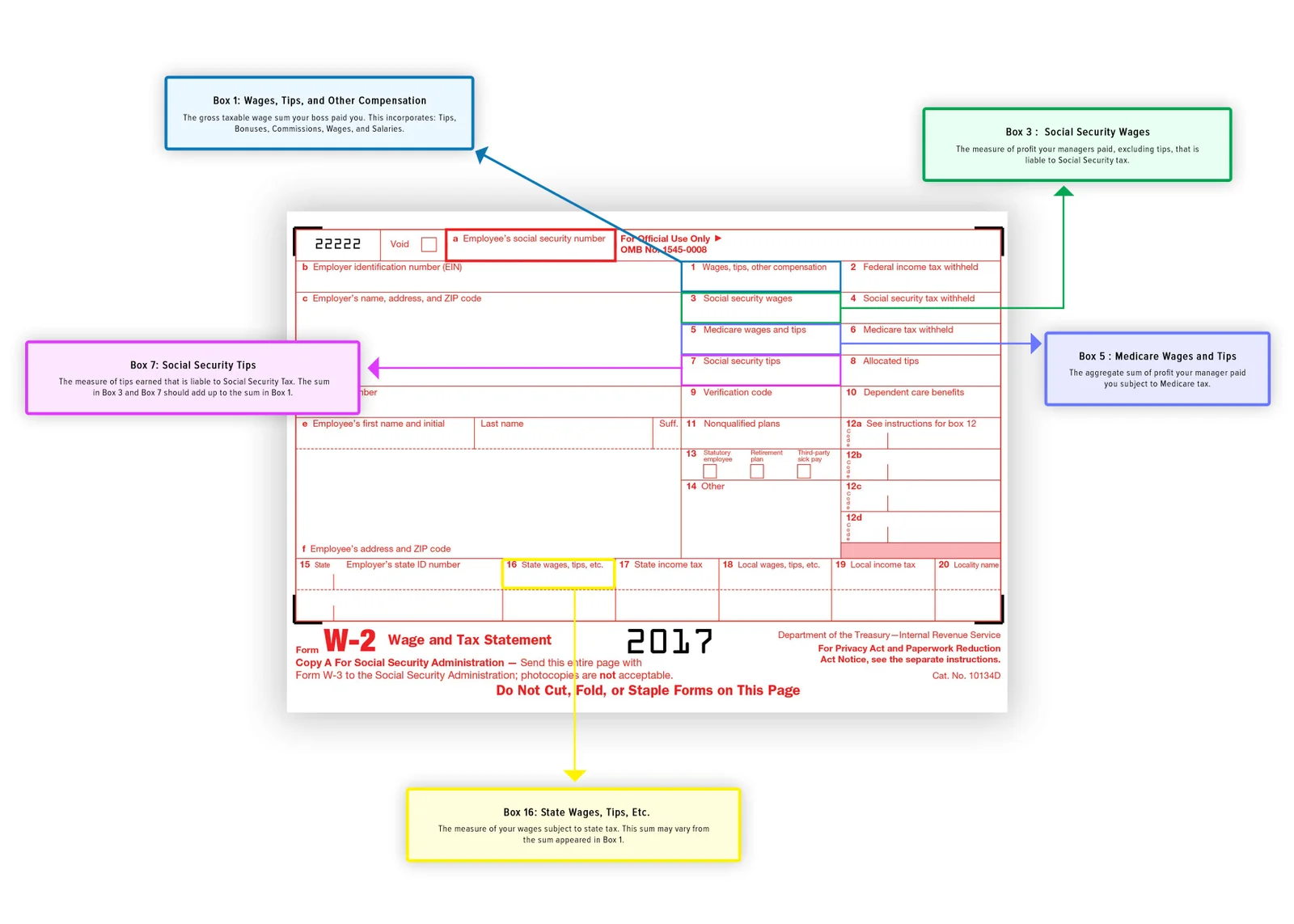
 

Difference between Form W-2 and paystub

  • Box 1: Wages, Tips, and Other Compensation – The gross taxable wage is the sum your boss paid you. This incorporates tips, Bonuses, Commissions pay, wages, and salaries.
  • Box 3: Social Security Wages – The measure of profit your managers paid, excluding tips, that is liable to Social Security tax.
  • Box 5: Medicare Wages and Tips – The aggregate sum of profit your manager paid you is subject to Medicare tax.
  • Box 7: Social Security Tips – The measure of tips earned that is liable to Social Security Tax. The sums in Box 3 and Box 7 should add up to the sum in Box 1.
  • Box 16: State Wages, Tips, Etc. – The measure of your wages is subject to state tax. This sum may vary from the sum that appeared in Box 1.


Pay Stub vs. W-2 Forms


Understanding the distinction between the last pay stub and W-2 can be confusing if you are not comfortable with finance and taxes. Representatives regularly get their W-2s and notice there is a contrast between the income on the last paycheck stub and the detailed profit on their W-2s. You should know the necessity of W2 Forms to understand them closely. Normally, this can be credited to one of three distinct situations:


1. Profit Included Non-Taxable Income Items


Non-taxable salary things would incorporate reimbursements for mileage or another kind of non-taxable cost you incurred that was paid back to you in a payroll period. Therefore, the gross wages on an employee’s pay stub will regularly contrast with the wages in Boxes 1, 3, 5, and 16 on the W-2 on the grounds that these non-taxable things will bring down gross taxable wages.


2. Organization-Sponsored Retirement Plan Participation


These kinds of plans, such as a 401(k), will lessen the taxable government and state compensation, which are accounted for in Boxes 1 and 16 individually.


3. Organization Health Insurance is a pre-tax deduction


This is the most well-known explanation behind your paycheck stub income not being quite the same as your W-2. If your organization offers pre-tax medical insurance and you have taken an interest, at that point, the taxable wages in Boxes 1, 3, 5, and 16 will be lower by the amount of the pre-tax health insurance deduction.


The most critical thing to remember is that, depending on the circumstances, an employee’s gross wages may contrast with their taxable wages.


Related Article: 4 Tips for Streamlining your Payroll Process

Nikul Somani

Nikul Somani

Accounting Specialist

An experienced IT and product professional with an in-depth understanding of payroll operations, paystub generation, and financial documentation. Nikul contributes to creating user-friendly tools that support income verification and business efficiency.

Related Blogs

How to access brock paystub

How to Get Your Brock Paystub? Step by Step Guide

May 1, 2026

Whether you’re a corporate employee or someone who has recently joined one…

How to Get Your Brock Paystub? Step by Step Guide

Pathik Sopariwala May 1, 2026

Whether you’re a corporate employee or someone who has recently joined one…

4 Valid Reasons to Use Pay Stub Generator

Sep 2, 2019

“I am okay without using a pay stub generator.” – If someone…

4 Valid Reasons to Use Pay Stub Generator

Nikul Somani Sep 2, 2019

“I am okay without using a pay stub generator.” – If someone…

Go Green with Pay Stub Calculator

May 11, 2017

This is the time to go green!   With the advent of…

Go Green with Pay Stub Calculator

Nikul Somani May 11, 2017

This is the time to go green!   With the advent of…

Create Your Professional Paystub Online and Download It in Just a Few Clicks. Accurate state tax calculations for all 50 states — no spreadsheets needed.
Earnings Statement Preview
Create Free Paystub
Secure Payment Via:
all payment methods
Satisfaction Guarantee
Secure Ordering
Money Back Guarantee
Compliant Layouts
2026 IRS & SSA Compliant Layouts

Updated with the OBBBA

About StubCreator®

StubCreator is an online paystub generator tool to create accurate, detailed pay stubs easily without requiring a payroll system. This tool is specifically designed to meet the unique needs of employees, independent contractors, and any other type of business. It provides accurate calculations of federal and state taxes in all 50 states, allowing users to produce compliant paystubs.

Quick Links
  • About Us
  • Terms & Conditions
  • Privacy Policy
  • Refund Policy
  • FAQs
  • Blog
  • Pricing
  • Reviews
  • Contact Us
Paycheck Stubs
  • Paystub Generator
  • Advanced Paystub
  • Canada Paystub
  • Custom Paystub
  • Pay Stub Templates
  • My Paystubs
  • Free Hourly Paycheck Calculator | Estimate Your Take-Home Pay
Get In Touch

6500 Lantana Dr
Denton, TX 76208

4.8 / 5
Based on 774 reviews

Follow Us

© 2026 STUBCREATOR.COM, ALL RIGHTS RESERVED

Sign In to Stubcreator

Forgot password? Reset
Don't have an account? Sign Up

Sign Up to Stubcreator

Check your email you can get the password, if you have already password then enter password and sign in to stubcreator account.
Already have an account? Sign In
🎁 ×
×

Claim Your
1st FREE
Paystub of 2026

  • No Sign-Up
  • No Credit Card
  • Instant Delivery
Grab This Offer