.png)


 Chat with us now!
 Send Email!


Pay stubs are one of the most vital documents, clearly showing your earnings and deductions as an employee. You might wonder how to get a paycheck stub as an employee of Barrett Business Services, Inc. Don’t worry.
This comprehensive guide will walk you through the steps to obtain your BBSI pay stubs quickly and efficiently through BBSI login. However, a free paystub generator always allows employers to create organized and professional payroll records for employees and contractors.
Also Read: How to Access WinCo Pay Stubs?
What is BBSI?
BBSI (Barrett Business Services, Inc.) is a U.S.-based Professional Employer Organization (PEO) and business management solutions provider. BBSI helps small and medium-sized companies handle payroll, human resources, risk management, and staffing.
Why Are BBSI Pay Stubs Important?
BBSI pay stubs issued through Barrett Business Services, which is your payroll provider, and traditional pay stubs are equally important for employees as well as employers.
The document serves a few main purposes:
- Record Keeping: BBSI pay stubs keep a record of an employee’s wage deductions and taxes through the BBSI Payroll System. This may also be checked for some level of tax planning and financial record-keeping.
- Proof of Income: Though the BBSI pay stub is technically issued by BBSI (not the client company), it suffices as documentation for individuals taking out a loan or finding housing, mortgage, or verifiable wages when large financial commitments are made.
- Tax compliance: A BBSI check stub also ensures that only the taxes are being withheld, with nothing perpetually hanging over tax authorities as a possible obligation to collect.
- Dispute Resolution: You can use BBSI pay stubs as a source that your organization’s employees have to negotiate with others like management or capitalists during the settlement of disputes, but in case payment is inconsistent or cuts were made.
Also Read: How to Access Your Doculivery Pay Stubs Effortlessly?
How to Get BBSI Pay Stubs?
Step 1: Register for BBSI Online Services
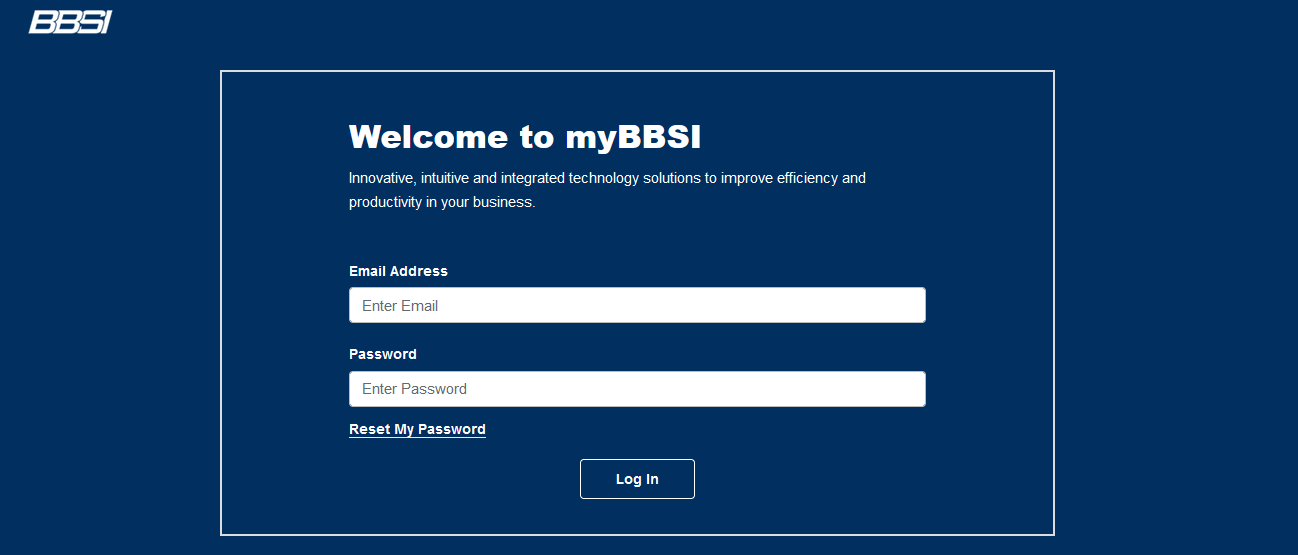
You must register for My BBSI employee login to access your pay stubs online.
Here’s how:
- Go to the BBSI website and click on BBSI portal employee loginor employee self-service.
- Look for the “Register” or “Sign Up” option with login id. They will ask you to type in your details and verify your identity.
- Use the onscreen instructions to create a username and password for your account.
- After this, log in to your account using your credentials.
Step 2: Access Your Pay Stubs
After doing BBSI portal employee login, you can easily access your pay stubs:
- From your BBSI account dashboard, go to the “Payroll” or “Pay Stubs” link. The most recent pay stubs are here; click on them to view them.
- Usually, you choose the pay period to view and then receive a downloadable PDF copy of the corresponding pay stub to check workers’ compensation.
Also Read: How to Access UIC Pay Stubs?
Step 3: Download and Save Your Pay Stubs
To keep a record of your pay stubs, follow these steps:
- Select the pay stub you want to save by logging in BBSI employee portal.
- Once the pay stub opens in a PDF, please save it to your computer or device with the download or save button.
- Using a paystub template makes it easy to check how earnings, taxes, and deductions are displayed on a paystub before producing the final copy.
- You can also print a hard copy if needed.
Step 4: Review Your Pay Stubs
It’s important to review your check stubs regularly through the BBSI payroll portal to ensure accuracy.
Here’s what to look for:
- Gross Earnings: Ensure that the gross amount is the salary (or wage for hourly work) agreed upon by the company.
- Deductions: Check for deductions like taxes, insurance, retirement contributions, and other benefits.
- Net Pay: You need to make sure that what you get to keep is correct.
- Year-to-Date (YTD) Information: Review YTD totals for earnings and deductions to keep track of your financial status over the year.
- Contact HR if You Find Discrepancies: If you spot a discrepancy or have questions about your pay stubs, feel free to contact your HR department.
Also Read: How to Get Oasis Pay Stubs?
Conclusion
Securing a pay stub is easy with BBSI’s online registration services. The blog includes compensation planning and tax filings. Following this guide through the process and checking pay stubs for accuracy allows you to keep close tabs on your earnings while ensuring that your payments match your actual hours worked.
Disclaimer: StubCreator is not affiliated with BBSI or its Associates. BBSI brands or logos are trademarked or registered trademarks. The article general guidance for BBSI paystub access. Refer to BBSI’s official resources and consult HR for specific details.
FAQs:
1. Can you explain what BBSI pay stubs are and how employees can access them?
BBSI pay stubs are earnings statement documents for employees of businesses using Barrett Business Services (BBSI) for payroll. They are accessed by logging into the myBBSI portal.
2.What information is typically included in a BBSI pay stub, and how can I understand it?
A BBSI pay stub shows earnings, gross pay, deductions, and net pay, and you can view the full breakdown by selecting the pay period.
3.Where can I access my BBSI pay stubs online?
You can access your pay stubs online through the myBBSI Payroll Portal.
4.What login information do I need for accessing my pay stubs on the portal?
You need a registered username and password, plus multi-factor authentication.
5.How frequently are BBSI pay stubs available for viewing?
Pay stubs are available 24/7 and a new one appears each time payroll is processed for your pay period.
6.Can I print or download my BBSI pay stubs for record-keeping purposes?
Yes, you can download your pay stub as a PDF for a chosen pay period and print it for your records.