
.png)


 Chat with us now!
 Send Email!

What is a Good Net Promoter Score?
A good Net Promoter score (NPS), on average, falls between 30 and 50.
Here’s a general breakdown:
- Excellent NPS: 50 and above
- Good NPS: 30 to 49
- Average NPS: 0 to 29
- Poor NPS: Below 0
A score of 50 or more is considered excellent, as it shows that the majority of your customers will likely recommend your service or product to others. What is considered a good NPS score can vary by industry and location, so you should compare your score to industry benchmarks for a more accurate assessment.
Employee Net Promoter Score Questions?
The Employee Net Promoter Score measures how likely an employee is to recommend his or her workplace to others.
Here is a list of key questions that you can ask to understand and calculate your NPS:
Core eNPS Question:
- On a scale from 0 to 10, what is your likelihood of recommending [Company name] to a colleague or friend as a good place to work? “
Follow-Up Questions:
- What is the main reason for your score? “ This open-ended question allows for qualitative insight into the score.”
- What do you think is working well at [Company name]“
- What improvements would you make to [Company name] to make it a better workplace? “
- This question can be used to identify factors that affect the eNPS score.
- Do you feel valued for your contribution? “
- How would you rate our company culture? “
The following questions will provide deeper insight into factors that affect employee perceptions. They can also help identify areas in which the company could improve.
What is a Good Employee Net Promoter Score?
The following ranges are generally considered to be good employee Net Promoter Scores (NPS).
- Excellent eNPS: +50 and above
- Good eNPS: +30 to +49
- Average eNPS: 0 to +29
- Poor eNPS: Below 0
A score of 50 or more is considered excellent, as it shows that the majority of your employees will recommend your company to others. As with NPS scores, the “good” score for an eNPS will vary depending on industry, company size, and region. It is, therefore, helpful to compare your score with other organizations in your field.
How to Calculate Employee Net Promoter Score?
Follow these steps to calculate Employee Net Promoter Scores (NPS):
Survey Your Employees:
- Ask the core eNPS: “
Categorize the Responses:
- Promoter: Employees with scores of 9 or 10 on the survey. They are happy employees who are more likely to recommend your company.
- Passives: Are employees who score 7 or 8 on the scale. They are satisfied but not sufficiently enthusiastic to be promoted.
- Detractors: Employees with a response score between 0 and 6 are unhappy employees who could discourage others from joining the company.
Calculate the eNPS:
- Calculate the percentage of Promoters.
- Calculate the percentage of Detractors.
- Subtract from the percentage of Promoters the percentage of Detractors.
eNPS=%Promoters−%Detractors
Interpret the Score:
- A score between -100 and +100 is the result.
- A score of positive indicates that there are more promoters than detractors, while a score of negative indicates the opposite.
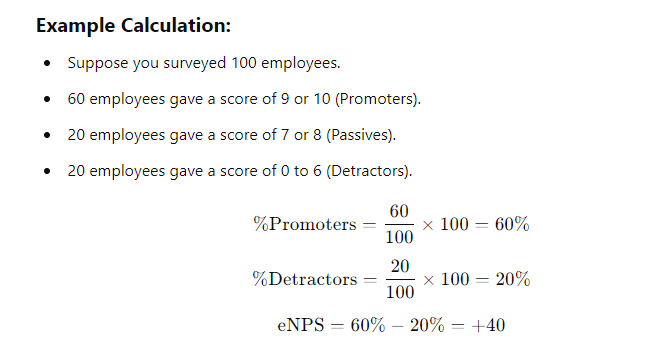
In the example above, a reasonable NPS score would be +40.
Also See: Employee Evaluation


