.png)


 Chat with us now!
 Send Email!



Form 4797 is for reporting gains and losses from the sale or exchange of business property. When it comes to reporting the sale of business property, taxes can quickly become complicated. However, if you’re selling real estate or other business property, understanding the Form 4797 is vital for making sure accurate reporting and compliance with the IRS rules are intact.
In this blog, we will be breaking down what is Form 4797, how it works, who needs it, and how to file it step by step using the latest IRS guidance, plus how tools like a free check stub maker can help you generate accurate income records that make reporting business property transactions much easier.
What is Form 4797?
Form 4797 is a tax form that businesses use to report the sale, exchange or involuntary conversion of business property. It assists the business owners and other self-employed individuals with reporting of gains, losses, and depreciation recapture on their tax return.
According to the IRS, Form 4797 is used to report:
- Exchange of tangible property
- Involuntary conversions
- Disposition of non-capital assets
- Various capital assets that are not reported on Schedule D
It is used to report gains made from the sale of business property, including property that is used to generate rental income and property used for industrial purposes or extractive resources.
What are the Form 4797 Instructions to Follow?
Below are the Form 4797 instructions to follow:
Line 1a: Enter gross proceeds from sales as reported on Forms 1099-B.
Line 1b: Enter the total amount from lines 2, 10, and 24 that pertains to partial dispositions of MACRS assets.
Line 1c: Enter the total amount of gains included on lines 2 and 10 due to partial disposition of MACRS assets.
Line 2: Outlines each property, date acquired, and sold, the gross sales price, depreciation allowable cost, or other basis, plus improvements and expense of sale.
Line 3-7: Calculate gains or losses from Forms 4684, 6252, and 8824 and then combine them appropriately.
Line 3: Gain from Form 4684, line 39.
Line 4-6: Gain or loss from Form 6252 and 8824.
Line 7: Combine lines 2 through 6. Enter net pay here.
Line 8: Non-recaptured net section 1231 losses from prior years.
Line 9: Calculate the net gain or loss.
Line 10: Insert ordinary gains and losses not included in lines 11 through 16.
Line 18-20: These lines deal with the recapture from various types of property under specific conditions.
Line 21: Summarize total gains or losses from Section 1250 property not reported elsewhere on the form.
Line 22-24: Calculation of recapture amounts under section 179 and 280F(b)(2) for properties like business vehicles.
Line 25: Collect the total gains and recapture amounts to be reported on your tax return.
How Does Form 4797 Sales of Business Property Help to Report?
Most people refer to Form 4797 as the IRS Form 4797. This form helps you, as a taxpayer, to report the sale, exchange, or other disposal of business property. Business property here means machines, furniture, vehicles, and buildings that you utilize in your business or trade to make money. When you sell that business property, the IRS is asking you to figure out if you made money or lost money by comparing the sale price with the adjusted sale price.
The adjusted sale price takes into account the depreciation, the decrease in value of the asset over time due to use. When a taxpayer deals with the sale or purchase of business properties, their profits or losses are recorded and taxed with Tax Form 4797 according to the U.S. government regulations. Form 4797 IRS instructions further clarify that taxpayers should separate their intent to calculate their taxes according to the property holding periods, and also whether or not the property has been depreciated.
Computation of capital and ordinary gains and losses can be simplified by using worksheets and examples provided in the instructions for Form 4797 pdf. Depreciation recapture is a tax provision that may lead a person to part of their gain being subject to higher tax rates.
Who Can File the 4797 form?
Taxpayers might also report a home that was used as a business on Form 4797. Gains made from the sale of gas or mineral properties are also reported on Form 4797. The following entities can file Form 4797:
- Sold business assets
- Disposed of depreciable property
- Had an involuntary conversion
- Sold rental or investment property used in business
- Are a partner/shareholder reporting Section 179 property sales
Form 4797 also applies when reporting depreciation recapture, involuntary conversions, or the sale of property that isn’t considered a capital asset under standard IRS rules.
How to File Form 4797 IRS?
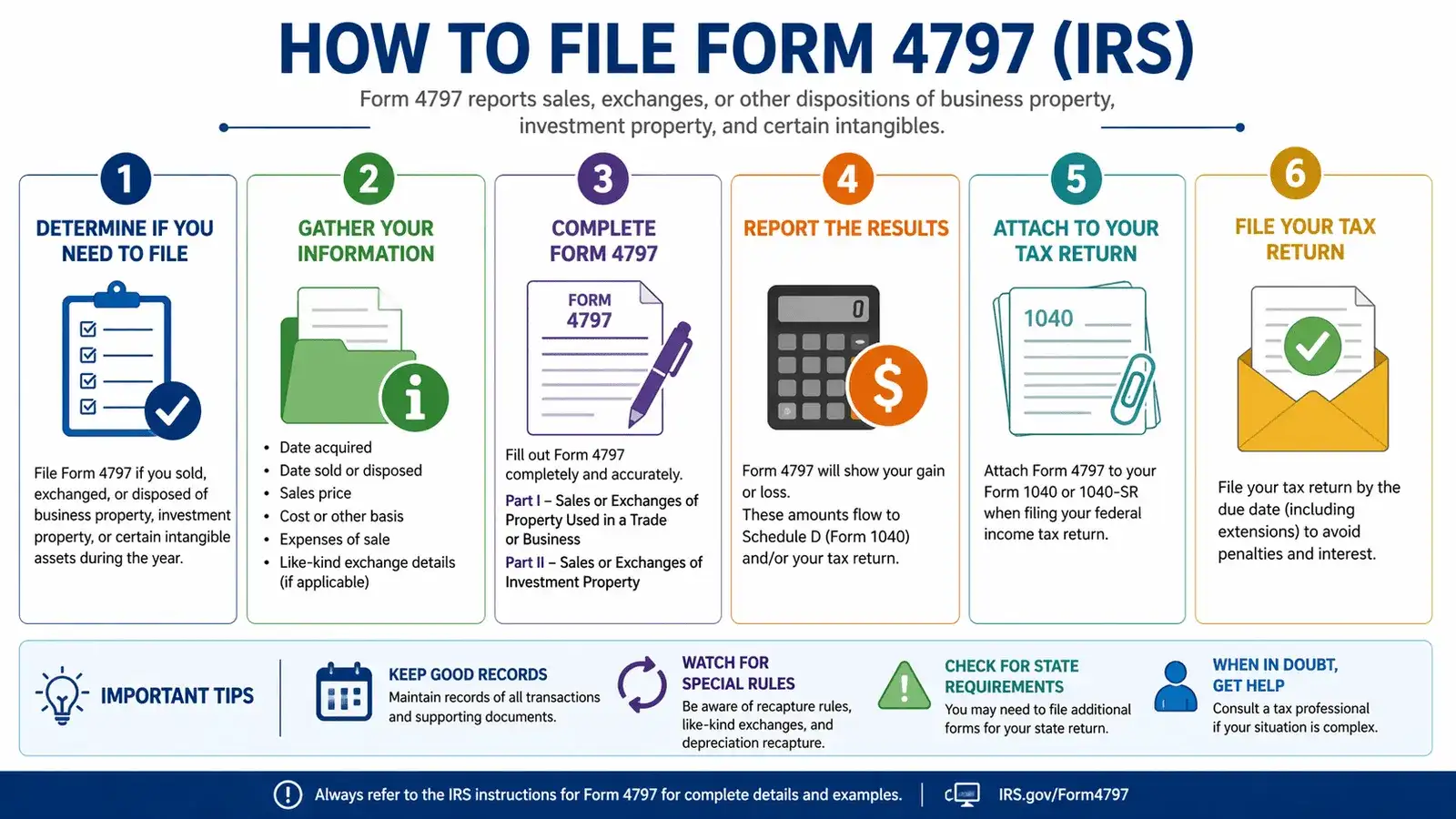
Form 4797 is divided into four sections. Generally, most depreciable property that one has held for more than a year is reported in,
- Part I: Sales or exchanges of property used in a trade or business and involuntary conversions from other than casualty or theft.
- Property held for a year or less and sold for a loss is recorded in Part II: Ordinary gains and losses.
- Capital assets held for more than a year and sold for a profit fall in the section labeled Part III: Gain from disposition of property under sections 1245, 1250, 1252, 1254, and 1255.
- Part IV is titled recapture amounts under sections 179 and 280F(b)(2): When business use drops to 50% or Less.
If a corporation or partnership, the entire amount entered on Line 17, Part II, should be added to the gross income line of Schedule C.
When a business, such as a flow-through entity like a partnership or an S corporation, sells a property, the partners and shareholders may face a tax event, either gain or loss, when the property is sold, and a Form 4797 is filed. Dispositions of capital assets that are not reported in Schedule D should be reported in Form 4797.
Difference between Schedule D vs Form 4797
Schedule D and Form 4797 are both used to report gains and losses to the IRS, but they apply to very different types of assets and transactions.
Schedule D (Capital Gains and Losses) is used to report gains or losses from the sale of capital assets. These include investments like stocks, bonds, mutual funds, cryptocurrencies, and personal-use property. The gains reported here are typically categorized as short-term (held < 1 year) or long-term (held > 1 year), with different tax rates applied. Schedule D is usually filed along with Form 1040 and often works in combination with Form 8949, where individual transactions are listed in detail.
Form 4797 (Sales of Business Property), on the other hand, is used for reporting the sale or exchange of business-related property. This includes assets like machinery, equipment, buildings, rental property, and depreciable property used in a trade or business. What makes Form 4797 unique is that it separates gains into ordinary income and capital gains, depending on factors like depreciation and how long the asset was held. Some gains may later flow into Schedule D if they qualify as capital gains.
| Factors | Schedule D | Form 4797 |
| Purpose | Reports gains/losses from capital assets | Reports the sales of the business |
| Types of Assets | Stocks, bonds, crypto | Machinery, equipment, rental property |
| Treatment of Taxes | Short & long-term capital gain rates | Mix of ordinary income & capital gains |
| Depreciation Handling | Not applicable | Includes depreciation recapture rules |
| Reporting Flow | Filed with Form 1040 | Flows partly with Schedule D after calculations |
What Do You Report on Form 4797?
When you report the sale of property on Form 4797, you must report:
- Description of the asset.
- Date you originally purchased the asset.
- Date you sold the asset and the price for which you sold it.
- The asset’s cash basis.
You use this information to calculate the following:
- The difference between the assets’ cash basis and resale price.
- Your gain, if any, on the resale of the property.
- Depreciation recapture, which affects how gain is taxed.
Note: Keeping accurate payroll records using a free pay stub template with calculator can help business owners track income, deductions, and taxes, making forms like Form 4797 easier to prepare during tax season.
Types of Assets Reported on Form 4797
To determine how to tax income from depreciable property, the IRS identifies different forms of property in accordance with sections of the Internal Revenue Code (IRC). The relevant classification of property and sales is:
- Section 1231: Personal property taxed as capital gains at sale.
- Section 1245: Personal property used in the operation of your business.
- Section 1250: Real property.
- Section 1252: Agricultural land held for 1 – 10 years before sale, for which you have deducted the cost of watering and leveling.
Key Takeaways
According to the IRS, Form 4797 (Sales of Business Property) is the document you use to disclose profit or loss from the sale or exchange of business assets. You will have to give details about the kind of assets, their purchase date, depreciation, and original cost in the form. Overall, Form 4797 is essential for accurately reporting gains or losses from the sale of business assets and ensuring correct tax treatment.
Keeping well-organized financial records throughout the year makes the filing process much smoother and helps avoid common errors.
People May Ask
1) What is the difference between Schedule D & Form 4797?
Schedule D includes your private gain, and Form 4797 includes gain from the sale of business property. Form 4797 can be complicated because it requires several facts, some of which you will not be familiar with.
2) What does Form 4797 mean?
Form 4797 is a basic form for reporting gains and losses from the sale or exchange of business property, including buildings and intangible assets.
3) Who must file Form 4797?
Real property that is used in business should file Form 4797.
4) Is Form 4797 difficult to complete?
Form 4797 is difficult to complete as it provides many errors.
5) How do I calculate gain or loss on Form 4797?
- Step 1: List down all the gross sales prices in column (d).
- Step 2: Subtract depreciation on column (e) from the cost in column (f).
- Step 3: Subtract the basis from the sales price.
6) What income is reported on the Form 4797?
Any gains or losses on the part of the home that is used for business purposes are ordinary gains or losses & are applicable.
7) What is part I of Form 4797?
Part I of Form 4797 is for the property held for more than 1 year.
8) Is Form 4797 a capital gain?
The amount on Line 32 will be treated as capital gain income on Form 4797.
9) What is the difference between Form 4797 and Schedule D?
Schedule D is your private gains, and Form 4797 contains gains from the sale of goods in a commercial enterprise. Form 4797 can be complicated because it requires a lot of data, some of which you will not be familiar with.
10) What transactions are reported on Form 4797?
Form 4797 is used to report the sale or disposition of business property, including depreciable assets and certain real property used in a trade or business.
Also Checked:
W2 vs W4: What’s the Difference
Make 1099-MISC Tax Form Online