.png)


 Chat with us now!
 Send Email!

Are you a business owner in the United States looking to streamline contractor management and ensure bulletproof tax compliance? Understanding the difference between a W9 vs 1099 form is a fundamental step.
While both relate to non-employee payments, the W-9 serves as your form for gathering necessary tax information, while the 1099 is the document you will issue to report those payments. Just as using a free paystub generator helps simplify payroll documentation for employees, understanding these forms simplifies contractor tax reporting.
This blog will provide a practical guide to W-9 meaning, 1099 form meaning explaining who is responsible for each, and typical scenarios for their use will be provided. Let us see about 1099 vs W9 forms in detail.
What is a W9 Tax Form?
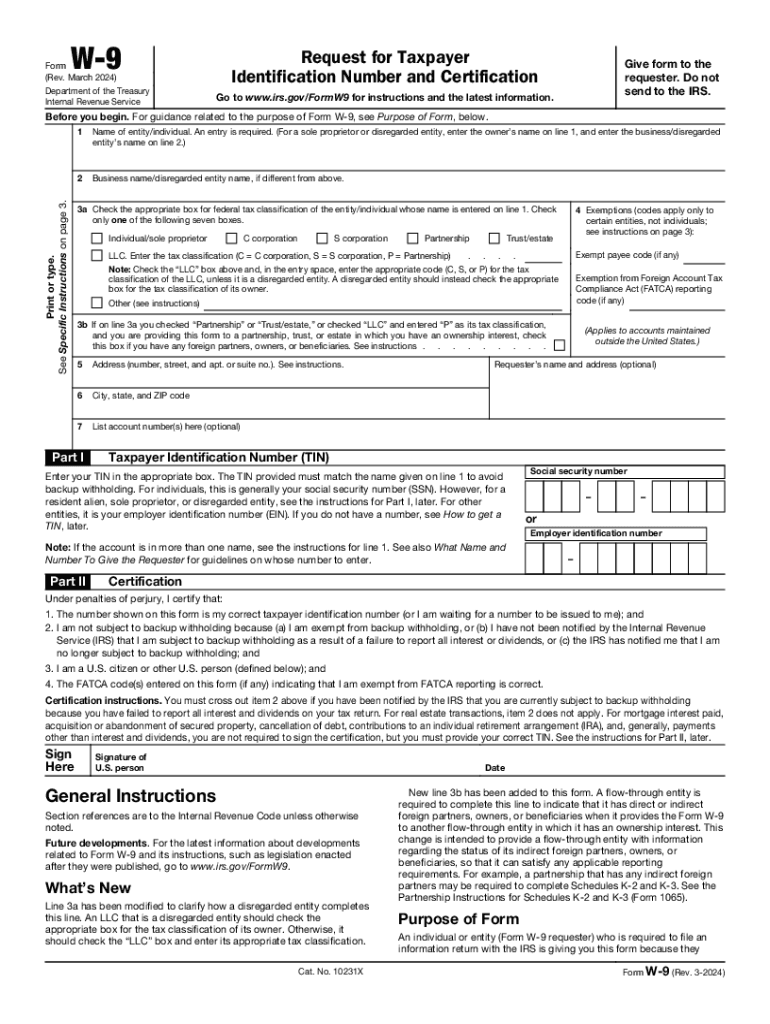
The W9 tax form is a document which uses to collect essential tax information from a contractor, vendor, or freelancer before paying them.
A W-9 form is a formal, written request document that is used by businesses to collect taxpayer identification information, specifically name, address, and SSN, from independent contractors, freelancers, or vendors. The contractor fills it out, signs it, and hands it back. It never goes to the IRS directly; it stays on file with the business requesting it.
What is a 1099 Form?
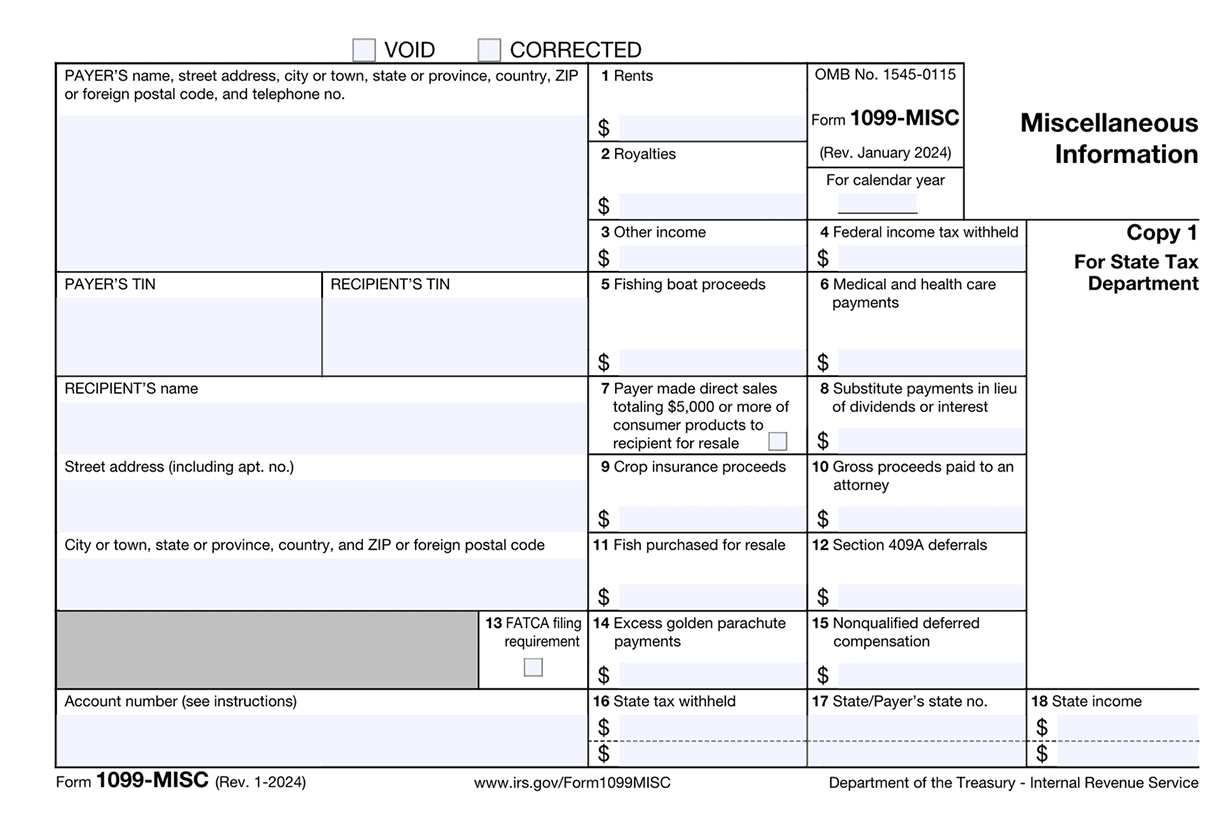
A 1099 form is an IRS information return, a tax document filed with the IRS, and sent to a contractor to report how much the contractor was paid during the tax year.
If the W-9 is the intake form, the 1099 form is the year-end report card. It tells the IRS, here’s what we paid this person, and they need to report it as income.
Unlike the W-9, the 1099 is filed directly with the IRS. The contractor uses it to verify income when filing their own taxes.
What Information Does a Form W9 Collect?
The following information is being collected by Form W-9:
- Legal name of the individual
- Business name
- Federal tax classification
- Exemption codes
- Mailing address
- Social Security Number (SSN)
What Information does a 1099 Form Collect?
The following information is being collected by the 1099 Form:
- Full name of the individual
- Business name and address
- Social Security Number (SSN)
- Total non-employee compensation
- Federal tax withheld
- State tax withheld
What is a W9 Tax Form For?
A W9 form is used for the following purposes:
- Independent contractors’ payments: If you’re a freelancer or a contractor, a company shall ask you to fill out an independent contractor tax form before they pay you.
- B2B payments: Firms collect W-9 forms from vendors to verify business name, confirm tax classification, and avoid backup withholding.
- Legal settlements: A W9 form shall be required while reporting settlement payments and debt cancellation income.
What is a 1099 Form Used for?
A 1099 form is used to report the following information:
- Reporting payments to independent contractors and freelancers
- Reporting interest income
- Reporting dividend income
- Reporting retirement distributions
Who Fills Out a Form W9?
Independent contractors, freelancers, sole proprietors, LLCs, and non-employee service providers complete a fillable W9 tax form. If you’re paying someone as a business expense and they’re not on payroll, you’ll almost certainly need a W-9 form 2026 from them before issuing payment.
Who Fills Out a Form 1099?
A Form1099 is filled out by the payer, business, or individual who made the payment. For example, if a company pays an independent contractor or freelancer, the company fills out a form such as Form 1099-NEC and sends a copy to both the recipient and the IRS. The person who receives the 1099 does not fill it out; they only use it to report their income when filing their tax returns.
When Should You Request a Form W-9?
Request the tax form for independent contractor before the first payment is made. This avoids messing up at year-end and ensures you have accurate information for 1099 filing. The IRS recommends keeping completed W-9 forms on file for at least four years.
2026 W-9 Form Updates You Need to Know
The IRS released a draft revision of Form W-9 (Rev. January 2026) that introduces meaningful changes businesses and contractors should prepare for:
- Sole Proprietor TIN Clarification: Sole proprietors must now enter their Social Security Number (SSN), not an EIN. The previous W9 2025 version permitted either; the 2026 draft removes that flexibility.
- Disregarded Entity Rule: Single-member LLCs classified as disregarded entities must report the owner’s TIN, not the LLC’s EIN. If the direct owner is also a disregarded entity, the TIN of the first non-disregarded owner must be used.
- Digital Asset Broker Checkbox: A new checkbox in Part II allows U.S. digital asset brokers to certify exemption from information reporting, aligning with the introduction of Form 1099-DA for digital asset transactions.
- New Exempt Payee Code 14: This code applies to certain digital asset transactions that are exempt from backup withholding under IRS Notice 2025-33 through calendar year 2026.
When Should You Request a 1099 Form?
If you earned non-employee income and haven’t received it by the end of January, you should request a 1099 form. For example, if you worked as a freelancer or independent contractor and were paid $600 or more during the year, request a form such as Form 1099-NEC.
You can also request other types of 1099 forms if you received interest, dividends, retirement distributions, or payment app income and haven’t received the form. If you believe a business paid you qualified income but didn’t send the form, contact the payer to request a copy before filing your tax return.
2026 Filing Deadlines for Form 1099 That You Need to Know
For the 2026 tax year, deadlines are as follows because January 31 falls on a Saturday in 2026, all deadlines shift to the next business day where applicable:
- Form 1099-NEC: Due to both the IRS and recipients by February 2, 2026. No extensions are available for this form.
- Form 1099-MISC (paper): Due to the IRS by March 2, 2026.
- Form 1099-MISC (e-file): Due to the IRS by March 31, 2026.
- Recipient copies (most forms): Must be furnished by February 2, 2026.
- E-filing threshold: Businesses filing 10 or more information returns must e-file.
How to Fill Out a W9 tax form?
You can fill out a W9 tax form as mentioned below:
Line 1 & 2: Basic Information
The first thing you will see in Form W9 is to fill out the basic details. Start by entering your full name, and type a business name. Line 2 is optional, so you can skip it if you don’t want to enter the business name.
Line 3: Pick a Checkbox for Tax Classification
On line 3(a), you will be asked to check the appropriate box for federal tax classification. This way, you can help the IRS understand how to classify you for tax purposes. Go ahead and choose one like Individual/Sole Proprietor, C Corporation, S Corporation, Partnership, Trust/Estate, or Limited Liability Company (LLC).
If your business is registered as an LLC, it is not enough to simply tick the limited liability company box. Define how your LLC is taxed in the space provided on the next line 3(b).
Line 4: List out Exemptions
Moving on to the next, businesses or entities exempt from backup withholding must enter a number code or letter code. Other individuals, such as freelancers or contractors, may skip this field because they are not exempt. Also, if you are not sure what to describe in this field, you can skip it instead of entering an incorrect description.
Line 5 & 6: Write Address, City & State
At this point, enter your postal address in line 5, where you want to receive tax-related documents. After that, write your city and state name along with your zip code in line 6. In case of any queries, you can refer to the instructions given by the IRS on page 3.
List 7: Insert Account Number
At this point, it is optional to describe your bank account number, which is optional. This means you only need to add it if asked by the employer. This field is required to match the form to a specific account if you have multiple accounts.
Part I: Describe SSN
Next, you’ll get to Part I, where you’ll need to enter your Social Security Number (SSN). Sole proprietors or individuals can go ahead and enter their SSN, while select LLCs can describe their SSN.
Part II: Put Signature & Date
Finally, you need to review the details you entered to confirm that Form W9 is error-free. Read the details carefully and then add your signature and date. Upon completing Form W-9, you can submit it to your employer.
How to Fill Out a 1099 Form?
You can fill out a 1099 form as mentioned below:
Line 1: Specify Payer’s & Receiver’s Information
The first thing to do is describe your business information. Start with your legal business name, street address, mailing address, city, and state, followed by the ZIP code. Then, type in the office phone number. Additionally, you must enter your TIN and the recipient’s TIN. Now, similarly, fill in the recipient details like the full name of the contractor, their address, city, state, and zip code.
Line 2: Declare Nonemployee Compensation
Now, coming to the right, here comes the main section of your 1099-NEC form, where you must report how much you paid the contractor during the tax year. For example, if you paid a contractor $3,500 to complete a specific job, it goes straight into this box.
Line 3: Define State/Federal Tax Income Withheld
Below Non-Employee Compensation, you’ll find Line 4, where you must represent federal tax income withheld if and only if you have income tax withheld. Next, include the state income, not for the IRS, but for reporting to your state’s tax department. If you report to a state tax department, you’ll need to consider adding the tax information to the state income tax.
Line 4: Review & File
After providing all the required information, you will need to take a second look at the form to assess data accuracy. If everything is as you wanted, submit it to the IRS. Also, don’t forget to send a copy of Form 1099-NEC to the contractor (or non-employee) and keep another copy for your internal records.
W9 Vs 1099: Key IRS Differences
| Aspect | W-9 | 1099 (typical case like 1099-NEC/MISC) |
| Purpose | Collect TIN and info of payee | Report income paid to IRS & payee |
| Who completes | Payee (vendor/contractor) | Payer/business |
| Filing to IRS | Not filed | Filed with IRS if reporting requirement met |
| Reporting threshold (2026 tax year) | N/A | $2,000 for many payments (1066 law change) |
| Threshold for 2025 tax year | N/A (W-9 always collected) | $600 still applies for 2025 payments |
| Deadline | No IRS filing deadline; collect early | Usually by Jan 31 to the recipient/IRS or adjusted when a weekend/holiday applies (other 1099s may differ) |
Who Gets a W9 form Vs. Who Gets a W2 form?
Contractors or individual freelancers receive a W9 Form, while employers receive a 1099 Form.
If you are a contractor who is hired by a company, then you should complete the W9 form and return it to your employer. You have to provide your legal name, address, and a TIN to the employer. Those individuals who are not regular employees are the ones who complete the tax filing process of Form W9. A professional paystub template can also help maintain proper income records for documentation purposes.
In contrast, employers get the 1099 to report to the IRS the amount they have paid to a contractor or freelancer in the course of the year. After the employer has filled out Form 1099, he/she can send it to the IRS and give one copy to the contractor or freelancer.
What Are the Consequences of Not Issuing a W-9 Form 2026?
Below are the consequences of not issuing a W-9 form 2026:
- Backup withholding liability: If you fail to get the correct TIN from the recipient, you are legally required by the IRS to place backup withholding on payments made to them. The current backup withholding rate is 24%. This means you have to withhold this portion of their payment and send it directly to the IRS.
- Disallowed business expenses: During an IRS audit, if you cannot demonstrate that you made reasonable efforts to obtain a W-9 and accurately report the payments on Form 1099, the IRS may disallow the deductions you took for those payments. This increases your taxable income and overall tax liability.
- Increased audit risk: Failure to comply with information reporting requirements, such as receiving W-9s and filing 1099s, can increase the risk of your business being audited by the IRS.
What Are the Consequences of Not Issuing a 1099 Form 2026?
Below are the consequences of not issuing a 1099 form 2026:
- Penalties from the IRS for incorrect filing: The IRS imposes penalties for failing to file a correct information return by the due date, failing to include all required information, or filing incorrect information. These penalties vary depending on how late the filing was and the size of the business.
- Backup withholding: If the payer is required to withhold backup due to a missing or inaccurate W-9 and fails to do so, they may be liable for uncollected tax.
- Disallowed business expenses: If the IRS audits a business and finds that it should have issued 1099 forms but did not, it may not allow a deduction for those payments, which would increase the business’s taxable income and tax liability.
Key Takeaways
The debate over W9 vs 1099 forms is never-ending. The W-9 is collected first; it’s your intake of the contractor’s identity and tax classification. The 1099 comes later; it’s your formal report to the IRS of what you paid.
Neither form is difficult on its own. The challenge arises when businesses wait too long, collect incomplete information, or miss filing deadlines. With the IRS increasing digital enforcement, lowering e-filing thresholds, and introducing new forms for digital assets in 2026, staying ahead of compliance is more important than ever.
People May Ask
1) What is a W9 form used for?
A W9 form is used by businesses to collect a contractor’s or freelancer’s taxpayer identification number. The information provided on the W-9 helps the business correctly report payments to the Internal Revenue Service, usually when issuing a 1099 form at the end of the year.
2) What is a 1099 form in the U.S.?
The 1099 form is used by tax professionals to report payments to independent contractors, rental property income, income from interest and dividends, sales income, and other miscellaneous income recipients.
3) Can non-US citizens send a W-9?
Use W9 tax form to provide your correct TIN only if you are a US person. Caution: If you do not return the Form W-9 with the TIN to the requester, you may be subject to backup withholding.
Also check:
1099 Vs W2: What is the Key Difference?
What is FTE? Everything You Need To Know
FAQ's
What is the minimum amount for a 1099?
+
If you earned $600 or more in non-employee compensation from a person or business that is not typically your employer, you must receive Form 1099-NEC. You must receive Form 1099-MISC if you earned $600 or more from rent or royalty payments.
What is a W9 tax form used for?
+
A Form W-9 is used by businesses to request your taxpayer identification number (TIN), such as a Social Security Number or EIN. The information is provided to the Internal Revenue Service to accurately report non-employee payments, typically through a 1099 form.